Edytor Aries
TheEdytor Aries editor isjest onejednym ofz thetrzech threegłównych main editors ofedytorów Ancestris.
TheFilozofia philosophy of theedytora Aries editorwynika comesz frompotrzeby theergonomii needi for ergonomy and exhaustiveness.kompletności.
TheMożliwość possibilitypodania ofwszystkich beinginformacji abledozwolonych to provide all the information allowed by theprzez standard Gedcom standard.
InW aprzyjaznym user-friendlyinterfejsie interfacez withergonomicznymi ergonomic windowsoknami
TheZaletą advantagejest ismożliwość tozrobienia bewszystkiego able– tood A do everything, from A to Z, fromod AlphaAlfy todo Omega.Omegi.
DidCzy youwiesz? know?Jego Itsnazwa namepochodzi comesod fromkonstelacji theBarana constellation(Aries), ofpierwszej Aries,konstelacji thezodiaku, firstprzez constellationktórą ofprzechodzi theSłońce zodiac,wiosną. crossedRogi byBarana, thew sunkształcie inspirali, spring.symbolizują Thetakże hornsimpuls ofdo Aries,życia, inwieczny thepoczątek shapelub ofodrodzenie spirals,życia alsoi symbolizeświatła, theco impulseodpowiada towardsrównież life,początkom thewiosny eternalw restartingcyklu orpór rebirth of life, of light, also corresponding to the beginning of spring in the cycle of seasons.roku.
The possibilities ofMożliwości Aries aresą numerousliczne andi coverpokrywają 100% of the needs.potrzeb.
TheKompromisem compromisejest isto, thatże addingdodanie thetych samesamych informationinformacji canmoże bebyć donewykonane inna severalkilka wayssposobów andi youtrzeba willwybrać haveten to choose your most efficient mode.najefektywniejszy.
ThereDla iskażdego somethingznajdzie forsię everyone,coś andodpowiedniego – użytkownicy Ancestris usersczęsto oftenwybierają chooseużycie todwóch usegłównych two main editors:edytorów: Aries + Gedcom, oralbo Cygnus + Gedcom. SomeNiektórzy preferwolą toużywać usetylko onlyedytora theGedcom. GedcomOto editor. Here is a comparison of theporównanie 3 editorsedytorów, ifjeśli younadal stillmusisz haddokonać to make a choice.wyboru.
| Cygnus | Gedcom | Aries | |
| Kompletność
|
|||
| ++ | +++ | + | |
| +++ | + | +++ | |
| 80% | 100% | 100% | |
| + | +++ | ++ | |
| +++ | + | + | |
| 100% | 100% | 100% |
DescriptionOpis andi Usagezastosowanie
TheWygląd appearanceEdytora ofAries thezależy Aresod Editorwybranej dependskategorii on the entity category selected.wpisu.
ThePoniżej followingopisano thereforezatem describes theEdytor Aries Editordla foredycji editingkażdej each of thez 7 existingistniejących entitykategorii categorieswpisów inw thestandardzie Gedcom standard.Gedcom.
ForDla eachkażdej ofz thesetych categories,kategorii Aries usesużywa editingfunkcji featuresedycyjnych suchtakich asjak lists,listy, editprzyciski buttonsedycyjne andi tabszakładki, thatktóre aredziałają usedw inten thesam samesposób. way.Te Thesewspólne commonmechanizmy editingedycyjne devicesopisane aresą describedtylko only once.raz.
Pasek narzędzi Aries toolbar
TheEdytor Aries editoroferuje offersgrupę aprzycisków groupna ofpasku buttonsnarzędzi ingłównego theokna Toolbardla ofwiększej the main window, for greater efficiency.efektywności.

ThePierwszy first button is a shortcutprzycisk to openskrót ando otwarcia edytora Aries editordla onbieżącego the current entity.wpisu.
ThePozostałe otherprzyciski buttonsotwierają open anedytor Aries editordo toutworzenia createwpisu ankażdej entityz ofodpowiadających each of the corresponding entity.kategorii.
IndividualWpis Entitytypu Osoba
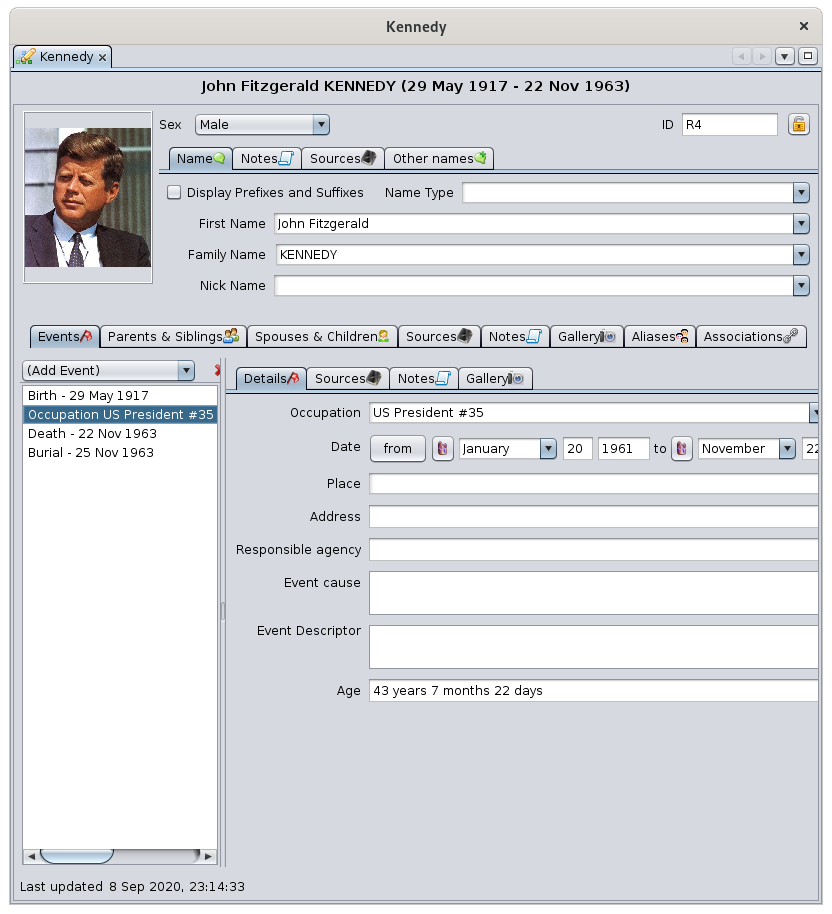
WhenGdy thewybranym selectedWpisem entityjest isosoba, an individual, theEdytor Aries Editordzieli issię dividedpoziomo horizontallyna intodwie twoczęści: areas:opis itsu descriptiongóry, atzdarzenia thei top,relacje eventsna anddole, relationshipsz at the bottom, with tabs.zakładkami.
DescriptionOpis of the Individualosoby
TheGórna upperczęść areajest isprzeznaczona dedicatedna toopis the description of the individual.osoby.
PhotoZdjęcie
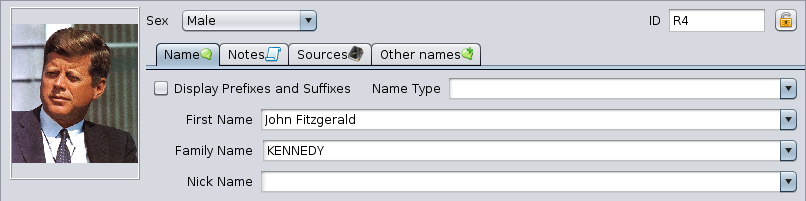
OnPo thelewej left,stronie youznajduje findsię amiejsce placeholderna powiązanie zdjęcia z wybraną osobą.
Kliknij na zdjęcie, aby je edytować, lub na puste miejsce, aby je załadować.
Kliknięcie prawym przyciskiem myszy na zdjęciu pozwala dodać zdjęcie. Wyświetlane zdjęcie to associatepierwsze anznalezione imagewe withwpisie. theAby selectedzmienić individual.kolejność zdjęć we wpisie, użyj Edytora Gedcom i przesuń odpowiednią właściwość myszką. Aby usunąć zdjęcie, również usuń je w Edytorze Gedcom.
ClickKliknięcie onprawym theprzyciskiem imageponiżej tozdjęcia edit it, or on the blank placeholder to load one.
Right-click on the picture to add one. The photo displayed here will the first one found in the entity. To change the order of the photo in the entity, use thewyświetla GedcomMenu editorkontekstowe anddla movetej the corresponding property with the mouse. To delete a photo, delete it from the Gedcom editor as well.
Right-clicking under the photo displays the Context Menu for that individual.
osoby.
SexPłeć
Numer ID number
OnW theprawym topgórnym rightrogu corner,znajduje you will find thesię identificationnumer numberidentyfikacyjny ofwybranej theosoby, selectedmożliwe individual,że possiblypoprzedzony preceded by his/herprzez numer Sosa, numberjeśli ifzostał it was generated.wygenerowany.
PadlockKłódka
AtW theprawym topgórnym rightrogu isznajduje alsosię atakże Padlockprzycisk buttonkłódki  .
. ItZaznaczenie marksgo theoznacza entityWpis asjako confidential if pressed.poufny.
NameZakładka Tab„Imię i nazwisko”
TheZakładka Namezawiera tabnastępujące contains the following fields:pola:
NameTyptypenazwiska:leavepozostawblankpusteorlubchoosewybierzonezoflistythe items from the drop-down list.rozwijanej.

First nameImię:choosewybierzfromzalistylistimionofjużfirstznanychnameswalready known in the genealogy.genealogii.Family nameNazwisko:choosewybierzfromzalistylistnazwiskofjużnamesznanychalreadywknown in genealogy.genealogii.Nick namePseudonim:typewprowadźinpseudonim,ajeślinickosobanametakifor the individual if he/she has one.posiada.
TheZaznaczenie pola DisplayWyświetlaj Prefixesprzedrostki andi Suffixesprzyrostki checkumożliwia box displays the followingwypełnienie 3 fieldsdodatkowych you can also fill in:pól:
NamePrzedrostekPrefiximieniaFamilyPrzedrostekname prefixnazwiskaNamePrzyrostekSuffixnazwiska
NotesZakładka Tab„Notatki”
NotesNotatki canmogą bebyć addeddodane atna thepoziomie individual'snazwiska name level.osoby.
ThisTa tabzakładka is used in działa similarw mannerpodobny throughoutsposób thew Ariescałym Editor.Edytorze ApartAries. fromZ thiswyjątkiem differenceróżnicy inw namemiejscu attachment,powiązania, youjej willużycie findznajdziesz its use in thew Noteszakładce TabNotatki of an individualosoby.
SourcesZakładka tab„Źródła”
SourcesŹródła canmogą bebyć addeddodawane atna thepoziomie levelnazwiska of the individual's name.osoby.
ThisZakładka tab is used in działa similaranalogicznie mannerw throughoutcałym theEdytorze AriesAries. Editor.Jej Apartużycie fromznajdziesz thisrównież difference in name attachment, you will find its use in thew Sourceszakładce TabŹródła of an eventzdarzenia.
OtherZakładka names„Inne tabnazwiska”
This is a listJest to addlista alternativesłużąca Firstnamesdo anddodawania Lastnamesalternatywnych toimion thei selectednazwisk individual.dla Herewybranej isosoby. an example:Przykład:
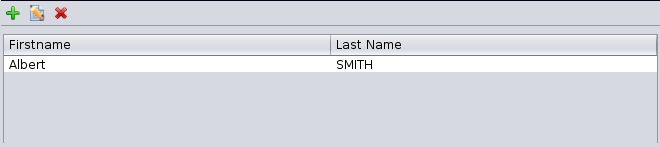
EditingEdycja otherinnych namesnazwisk isodbywa donesię withprzy theużyciu Editprzycisków buttonsedycyjnych andi bringsotwiera upokno apodobne windowdo similarzakładki toImię thei wholenazwisko, Namez tabtrzema already seen above, with three tabszakładkami (name,nazwa, note,notatka, sources)źródła).
EventsWydarzenia andi Relationshipsrelacje withz the Individualosobą
TheDolna lowerczęść areajest isprzeznaczona dedicatedna towydarzenia thedotyczące eventsosoby oforaz thena individual,relacje andtej toosoby thez relationshipsinnymi of this individual with other entities.wpisami.

EventsZakładka tabWydarzenia
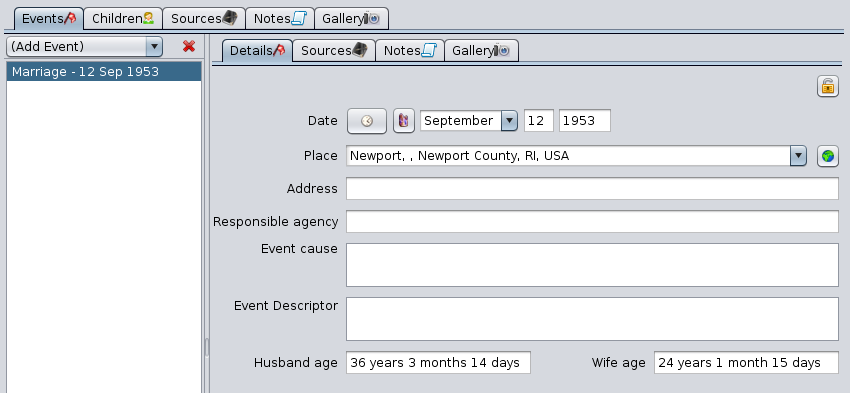
ThisTa tabzakładka allowsumożliwia youzarządzanie tolistą managewydarzeń. Jest przedstawiona powyżej.
Zawiera rozwijane menu oraz listę wydarzeń po lewej stronie, a listpo ofprawej events.opis Itkażdego iswydarzenia displayedz above.kilkoma zakładkami: Szczegóły, Źródła, Notatki, Galeria.
ItBelka hasoddzielająca obie części może być przesuwana, a dropjej downpozycja jest zapamiętywana pomiędzy sesjami.
Lista wydarzeń
-
Rozwijane menu
andDodajawydarzenielistumożliwiaofwybóreventswydarzeniaondothedodanialeft,doandlistythe description of each event on the right with several tabs: Details, Sources, Notes, Gallery.poniżej.The-
TheMenuAddzawieraEventnajczęstszedrop-downtypymenuwydarzeń,offerszarównoate,choicektóreofmogąeventszdarzyćtosięaddtylkotorazthewlist underneathThe menu lists the most common types of events, both those that can happen only once in a person's lifeżyciu (suchnp.asnarodziny,birth or death.śmierć...),andjakthoseithatte,canktórehappenmogąseveralwystąpićtimeswielokrotnie (suchnp.aszawód,occupation,miejsceresidencezamieszkania,or union)związek).-
IfJeśliyouniedon'tznajdzieszfindtego,whatczegoyouszukasz,arewybierzlooking for, choose thetypEventWydarzenie.type. It is generic and allows youJest toaddtypaogólny,categoryktóryofpozwalaeventsdodaćnotkategorięprovidedwydarzeniafornieprzewidzianąin thew menu.Next,Następniespecifynależytheokreślićnaturejegoofrodzajthewevent in the Event drop-downrozwijanym menulocatednaonkarcietheSzczegółyDetails tab below.poniżej.
-
TheListalistwydarzeńofwyświetlaeventsróżnedisplayswydarzeniathedanejdifferentosoby,eventsaleofniethewyświetlaindividual,wydarzeńbutrodzinydoes–nottedisplayznajdująthosesięof his family, which are in thewFamilywpisieentityRodzina.ClickingKliknięcieonwydarzeniaanpowodujeeventjegoselectszaznaczenieitiandwyświetleniedisplaysszczegółówitspodetailsprawejon the right.stronie.
separation bar between the two can be moved and its position is remembered from one time to the next.List of eventsDetailsZakładkatabSzczegółyItWyświetladisplaysszczegółythewybranegodetailswydarzeniaofzthelistyselected event in the event list.wydarzeń.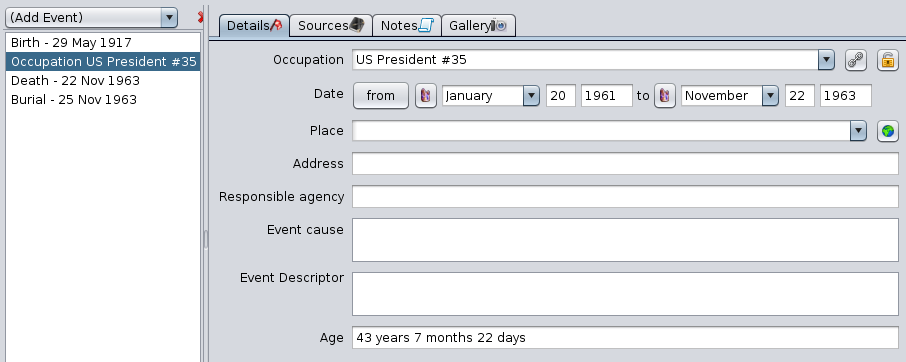
-
The buttonPrzyciskAssociatePowiążaosobępersonztotymthis eventwydarzeniem
,located–atdostępnythetylkotopdlaright,osóbappearsfizycznychonly–forumożliwiaindividuals.dodanieItinnejallowsosobyyoupowiązanejtozadd another individual related to the event.wydarzeniem.- Przykład:
Example:dlaforchrztuamożnabaptism,powiązaćthisojcabuttonchrzestnego,associatesmatkęthechrzestną,godfather,księdza,theświadków. - Przycisk
theumożliwiapriest,tylkothedodanie,witnesses.nie edytowanie. - Po dodaniu, osoba pojawi się na liście wyboru w zakładce Powiązania.
godmother,- Przykład:
- Przycisk
Thiszbutton only allows you to add, not to modify As soon as the association is added, the associated individual is displayed in the selection list of the Associations tab described just below.
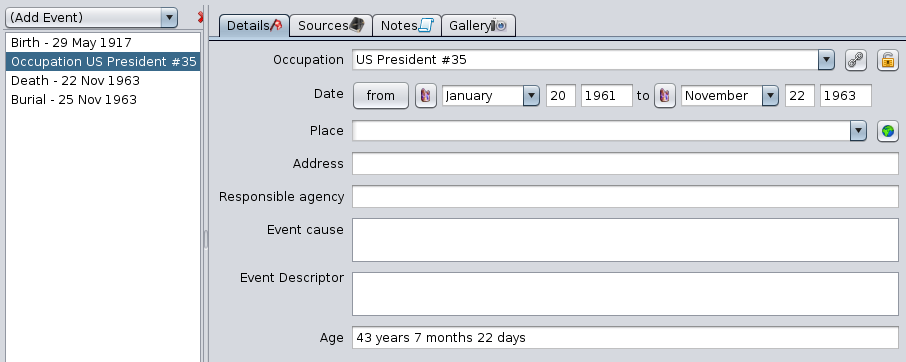

ToPotheprawejrightstronieofpolatheznajdujefield,siętheprzyciskEditEdytujplacemiejscebutton ,
, associatesktóryoruruchamiasearchesEdytoraMiejsc.placeWięcejtowthis event by bringing up the Place Editor. For more details, see thesekcjiPlaceEdytorEditormiejsc.

- Może to
enterbyćthenp.nameurzędnikofstanuthecywilnego,persondyrektorresponsibleinstytucjifor the event.This can be the registrar, the director of an institution, etc.itd.ExamplesPrzykłady:FordlaafrancuskiegoFrenchaktucivilstanustatuscywilnego:act:burmistrztheodmayor1792sinceroku,1792,ksiądzthewcześniej- dla
beforedowoduthatosobistego:dateForburmistrz - dla
identitydyplomu:card:dyrektortheszkołymayorFor a diploma: the headmaster, etc.itd.
priestan
EventPrzyczynacausewydarzeniaallows–youumożliwiatopodaniegraspprzyczynywhatwcausedprzypadkuthewydarzeniaeventnagłegowhenlubitlosowego.is- Przykłady:
accidentalprzyczynaevent,śmierci,anprzyczynaunforeseenprzeprowadzkievent.Examples:lubcauseemigracjiof Death, cause of move or immigration, etc.itd.
EventOpisdescriptorwydarzeniaallows–youdodatkowe szczegóły.- Uwaga: to
enter*nie*additionaljestdetails.Warningnotatka.notice:Tothispoleisodpowiada*not*znacznikowia note. This field corresponds to the TYPE tag.TYPE.
AgeWiekdisplays–thewyświetlacalculatedobliczonyagewiekofosobythewindividualchwiliat the date of the event.wydarzenia.
SourcesZakładkaTabŹródłaSourcesŹródłacanmożnabedodaćaddeddotowybranegothezdarzeniaselectedzaeventpomocąusingzakładkithe Sources Tab.Źródła.ThisTatabzakładkais used indziałasimilarwmannerpodobnythroughoutsposóbthewAriescałymEditor.EdytorzeItAries.isOpisanodescribedjąhere.tutaj.ItMais in the form of aformęselectionlistylistwyboruwith thezEditprzyciskamibuttonsedycji.
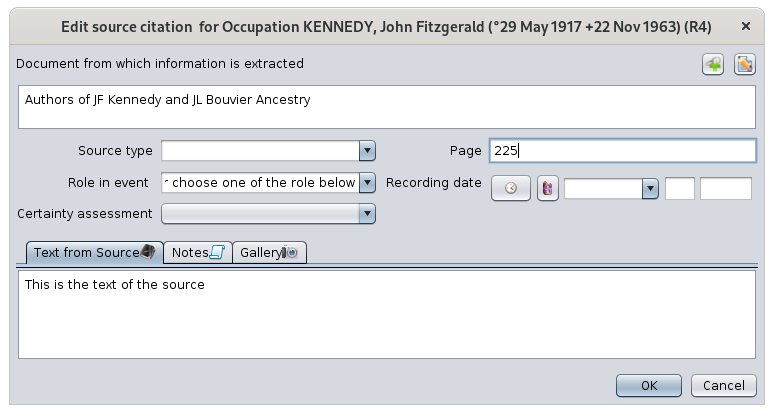
EachKażdylinewierszcorrespondsodpowiadatocytowaniu źródła. Cytowanie źródłasourcezazwyczajcitation.odnosiAsięsource citation usually refers to adosharedwspółdzielonegosourceźródłaandispecifiesokreślaonejednoofzethezdarzeń,events,jegoitsdatędateorazandrolętheosobyindividual'swroletymin the event.zdarzeniu.TheWartości 5columns'kolumnvaluespochodząarezderivedoknafrominformacjitheosourcecytaciecitationźródłowym,informationktórewindowpojawiathatsięappearspowhenkliknięciuyouprzyciskówclick on the edit buttons.edycji.SourceZdarzeniaEventsźródła:thistypiszdarzeniathewymienionytypewof event mentioned in the source.źródle.SourceOpisDescriptionźródła:ThisnazwaispowiązanegotheWpisunametypuof the referenced Source entity.Źródło.Page(s)Strona/y:Thenumernumberstronyofwthepowiązanympage in the referenced source.źródle.HasCzymultimediazawieraobject(s)obiekt multimedialny: "yes"tak",ifjeśli do źródłamediadołączonois attached to the source.multimedia.HasCzyNote(s)zawiera notatkę: "yes"tak",ifjeśli do źródłanotedodanois indicated with to the source.notatkę.
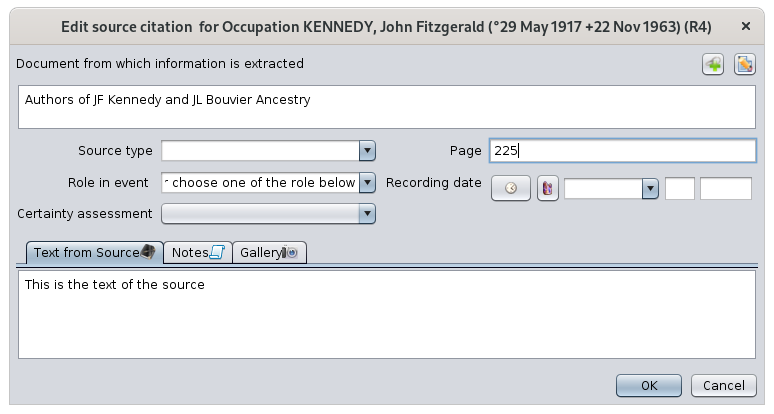
TheDwatwoprzyciskibuttonswatprawymthegórnymtoproguright are thetoEditprzyciskibuttonsedycji:ThePrzyciskLink buttonPołącz
attachesłączytheWpisSourcetypuentityŹródłotozethezdarzeniem.event.Przykład:Foraktexample,urodzeniaaprzypisanybirthdocertificatezdarzeniaat a birthnarodzin.ThePrzyciskEdit buttonEdytuj
editsedytujetheWpisSourcetypuentity.Źródło.
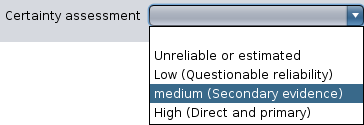
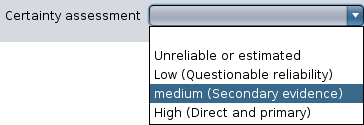
TheŹródłosourcenależyneedspołączyćtozebezdarzeniemattachedzaatpomocąthetycheventdwóchlevel,przycisków.viaMożnathesenp.2dodaćbuttons.aktyYouurodzeniacaniattachzgonu,foruprzednioexamplewprowadzonebirthiandopisanedeath certificates, after having previously entered and documented them inwSourceWpisachEntitiestypu Źródło.ThePozostałeotherpolafields are:to:RoleRolainweventzdarzeniu:thisdowolnyistekst,aalefreeproponowanetextsąbuttypowerolesrole,suchnp.asmąż,husband,żona,wife,ojciec,father,matka,mother, wife, child are proposed.dziecko.CertaintyOcenaassessmentwiarygodności:qualifiesokreślathejakośćqualityinformacjiofwedługtheponiższychinformation according to the following predefined criteria:kryteriów:
RecordingDatadatezapisu:datedata,whenkiedythezdarzenieventzostałowaszapisanerecorded,—andniekonieczniethereforetonotsamonecessarilycothedatadatesamegoof the event of the individual we have been talking about since the beginning.zdarzenia.TextTekstfromzesourceźródła:extractfragmentoftekstutheźródłowegosourceuzasadniającytextzdarzeniejustifyingdanejthe individual's event.osoby.IfJeślitheteksttextźródłaofzostałthejużsourceprzepisanyhaswalreadywpisiebeentyputranscribedŹródło,inniethetrzebaSourcegoentity,tutajitponownieis not worthwhile to put it here.wpisywać.
TheZakładki Notatki iNotes TabGaleriaandwGalleryoknieTabedycjiofcytatutheźródłowegowindowopisująmodifyingtenthecytat.quotationDziałającharacterizejaktheinnesourcezakładkiquotation.NotatekTheseitabsGaleriiarewusedEdytorzethroughout the Aries Editor like the other Notes and Gallery tabs.Aries.ApartPozafromróżnicąthiswdifferencesposobieindołączeniahowdotheycytatówareźródłowych,attachedznajdziesztoichsourceużyciecitations,takżeyou will find their use in thewNotesZakładceTabNotatkiandorazGalleryZakładceTabGaleriaof an individual.osoby.RegardingWtheprzypadkuphotoszdjęćof the sourcesźródeł (deeds,akta,certificates,certyfikatyetc.itp.),they'dlepiejratherumieścićbejeputwingaleriitheźródłagalleryniżofwthegaleriisource than the gallery of the individual.osoby.NotesZakładkaTab
NotatkiNotesNotatkicanmożnabedodaćaddeddotozdarzeniaanosobyindividual'sprzyeventużyciuusingzakładkithe Notes Tab.Notatki.
ThisTatabzakładkaisjestusedużywanathroughoutwthecałymAriesEdytorzeeditor.Aries.ApartPozafromróżnicąthiswdifferenceprzypisaniuindothezdarzeń,attachmentznajdziesztojejevents,użycieyoutakżewill find its use in thewNotesZakładceTabNotatkiof an individual.osoby.GalleryZakładkatabGaleriaMediaMultimediacanmożnabedodaćaddeddotozdarzeniaanosobyindividual'szaeventpomocąusingzakładkithe Gallery Tab.Galeria.
WeNawillpoziomieputzdarzeniahere,umieścimyattutajthezdjęcialevelosobyofztheczasuevent,tychthe photos of the individual at the time of these events.zdarzeń.ThisTatabzakładkaisjestsimilarlyużywanausedpodobniethroughoutwthecałymAriesEdytorzeeditor.Aries.ApartPozafromróżnicąthiswdifferenceprzypisaniuindothezdarzeń,attachmentznajdziesztojejevents,użycieyou will find its use in thewGalleryZakładceTabGaleriaof an individual.osoby.ParentsZakładkaandRodziceSiblingsitabrodzeństwoThisZakładkatabtamanagessłużythedoparentszarządzaniaandrodzicamisiblingsiofrodzeństwemthewybranejselected individual.osoby.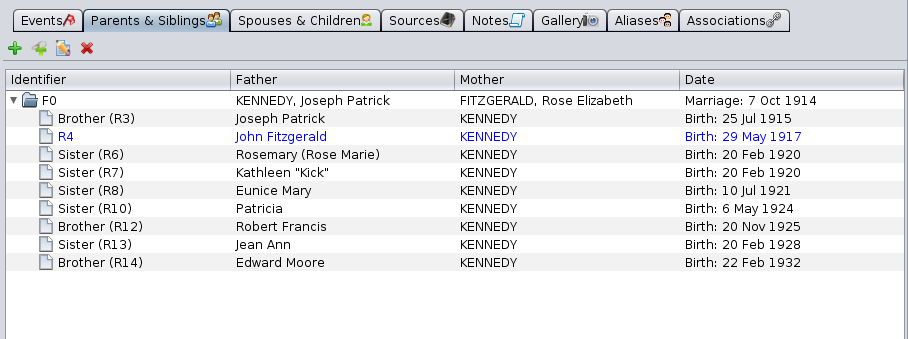
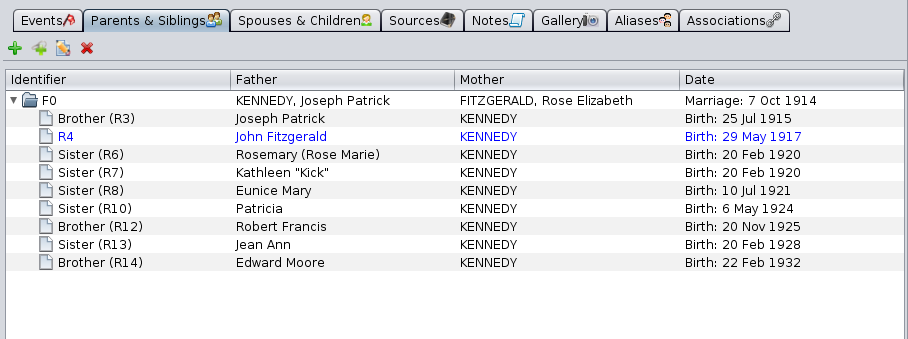
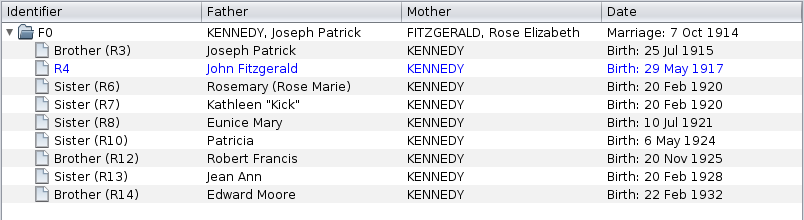
ThisZakładkatabmais in the form of aformęTreelistylistdrzewawithzEditprzyciskamibuttonsedycji.TheirZasadaprincipledziałaniaisjakthewsameopisanymaswcześniejdescribed in the corresponding paragraph, namely :akapicie:TheDodajbuttonrodzicówAddtejparents to that personosobie
allows—youumożliwiatododanieaddojcatheifathermatkiandwybranegomotherindywidualnegoofwpisu.the selected individual.AOtwieranewsięwindownoweofoknotheedytora ArieseditorzopenswpisemonRodzina,agdzieFamilymożnaentity,określićwhere you can specify the parents.rodziców.
ThePołączLinkztoistniejącąan existing familyrodzinąbutton allows—youumożliwiatoutworzeniecreatewięzi genealogicznej między wybranym wpisem indywidualnym agenealogicalistniejącąlinkrodzinąbetweenwthe selected individual and an existing family in the genealogy.genealogii.AWyświetlanewsięwindownoweisoknodisplayedzwithlistąajużlistzarejestrowanychof already registered families.rodzin.
TheEdytujEditzaznaczonąSelected Familyrodzinębutton edits—theedytujefamilyrodzinęthatwybranąisnaselectedliścieinponiżej.the- Aries
opensotwieraanowenewoknoeditoredytorapositionedzonpozycjąthenafamily.tę rodzinę.
list underneath.- Aries
TheUsuńDeletezaznaczonąSelected Familyrodzinębutton
deletes—theusuwafamilyrodzinęthatwybranąisnaselectedliściein the list underneath.poniżej.
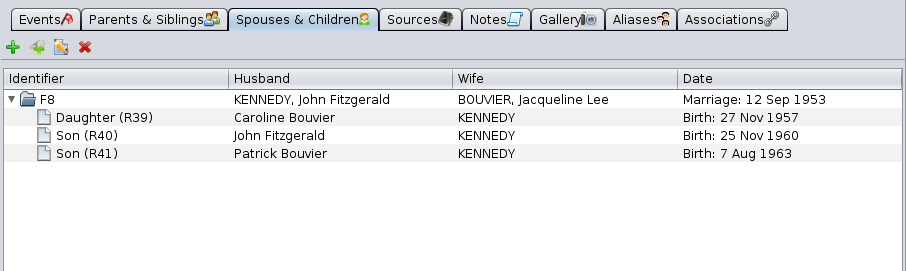
SpousesZakładkaandMałżonkowiechildrenitabdzieciThisTatabzakładkamanageszarządzatheróżnymidifferentmałżonkamispouseswybranegoofindywidualnegotheorazselecteddziećmi,individualktóreasmiał(a)wellzaskażdymthezchildren he or she has had with each of them.nich.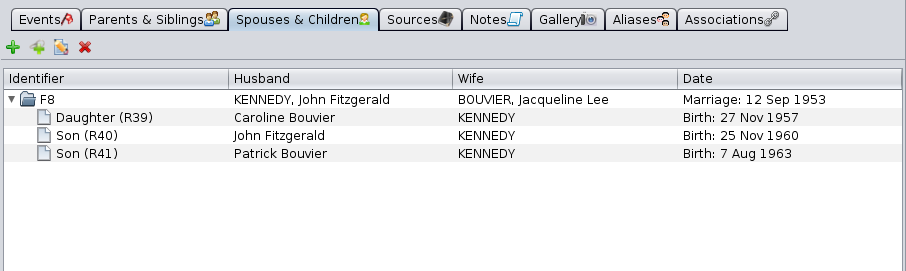
ThisZakładkatabmais in the form of aformęTreelistylistdrzewawithzEditprzyciskamibuttonsedycji.PrinciplesZasadyaredziałaniathejaksame as the tab described above.wyżej.SourcesZakładkaTabŹródłaSources can be added to the individual directly throughŹródłaSourcesmożnaTab.dodawać bezpośrednio do osoby za pomocą zakładki Źródła.ThisTatabzakładkaisjestusedużywanathroughoutwthecałymAriesEdytorzeEditor.Aries.ApartPozafromróżnicąthiswdifferenceprzypisaniuindotheosoby,attachmentznajdziesztojejanużycieindividual, you will find its use in thewSourceszakładceTabŹródłaof an eventzdarzenia.NotesZakładkaTabNotatkiThisZakładkatabtaismain the form of aformęselectionlistylistwyboruwith thezEditprzyciskamibuttonsedycji.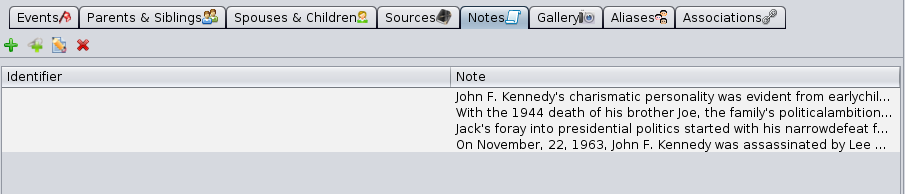
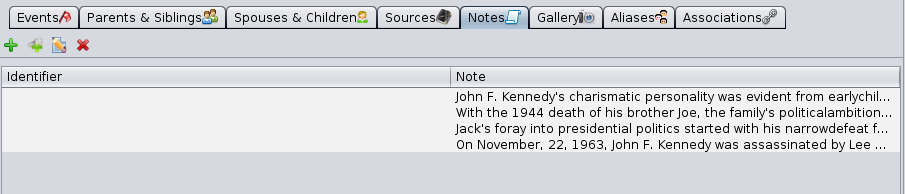
TheNotatkinotesutworzonecreatedlubordołączoneattachedkwalifikująqualifywybranethe selected event.zdarzenie.WeWidać,canżeseenathatliścietheremogącanznajdowaćbesiętwodwatypestypyof notes in the list:notatek:NotesWpisyEntitiestypu Notatka,therefore—shareablewspółdzielonewithzotherinnymientitiesWpisamiofwthegenealogii,genealogy,identyfikowaneidentifiednumeremby an ID number.ID.SpecificNotatki specyficzne (embedded)osadzone)notes,—notniewspółdzielone,shareable,bezwithoutID.ID number. SeeZobaczsharedinformacjeinformationwspółdzieloneforpomorewięcejdetails.informacji.
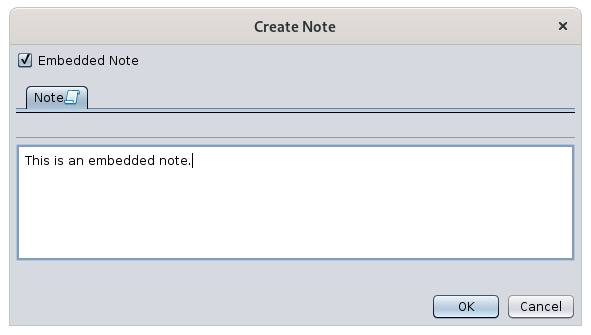
WithZathepomocącreateprzyciskubuttonutwórz itmożnaisutworzyćpossibleWpistotypucreateNotatkaalubsharednotatkęNoteosadzonąEntityworzdarzeniu,azależnienoteodspecificzaznaczeniatoopcjithewevent (therefore embedded) as indicated by the check mark in the window that appears.oknie.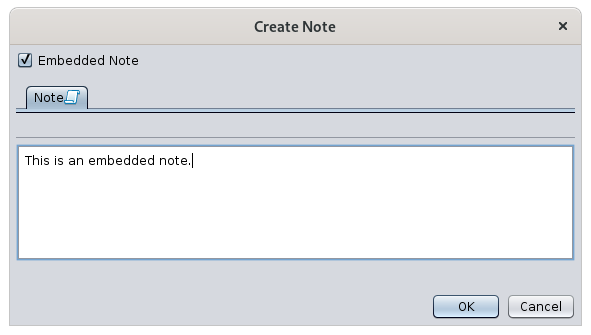
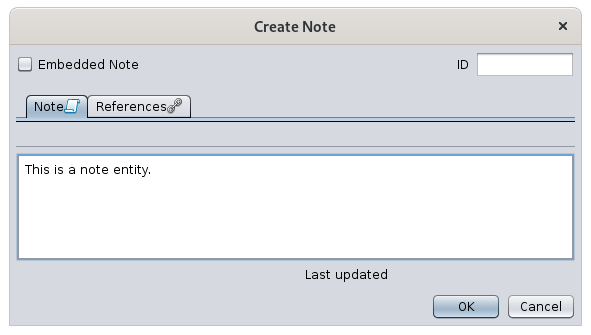
WithPrzyciskthe edit buttonedytuj itpozwalaisnapossiblemodyfikację notatki.Jeśli w edytorze widoczna jest zakładka Odniesienia i numer identyfikacyjny notatki — jest to
Notatka.modifyWpisatypunote.InWthisprzeciwnymcase,razieif—thenotatkaReferences tab is visible and if the window shows an identification number for the note, it is a shared note (window below). Otherwise it is a specific note (similar to the window above).osadzona.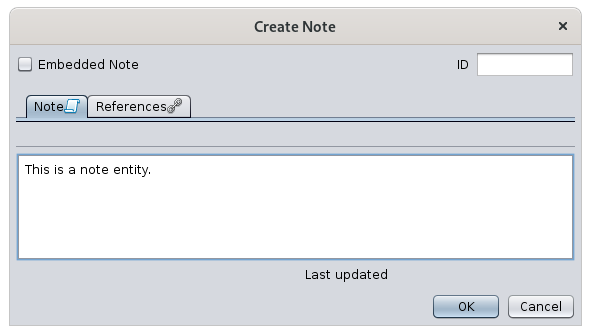
TheKartaReferencesŹródłatabzostałaisopisanadescribed below.poniżej.GalleryKartatabGaleriaThisTatabkartaismain the form of aformęselectionlistylistwyboruwith thezEditprzyciskamibuttonsedycji.
TheMultimediamediautworzonecreatedlubordołączoneattachedkwalifikująqualifiesosobętheniezależnieindividualodindependentlyjakiegokolwiekof any event.zdarzenia.WeTutaj,willnaputpoziomiehere,osobyat(athenielevelzdarzeń),ofumieszczamythezdjęciaindividual,tejandosoby,notktóreatbędąthewyświetlanelevel of the events, the pictures of this individual that will be displayed in thewDynamicDynamicznymtreedrzewie.NoteZwróćhereuwagęthenablueniebieskąstargwiazdkę ,
, whichktóraallowspozwalayouokreślićtomediumspecifywyświetlanethedomyślniemediawtodrzewiebegenealogicznym,displayedjeślibyistniejedefaultwieleinmediówthedofamily tree, in case there are several media to choose from for the individual.wyboru.ThePrzyciskibuttonsdofortworzenia,creating,łączenialinkingluboredycjieditingmediumaotwierająmediaoknodisplaysedycjithe media editing window.mediów.AliasesKartaTabPseudonimyThisTatabkartamanageszarządzatheróżnymidifferentpseudonimamialiaseswybranejof the selected individual.osoby.AnPseudonimaliastoisrelacjaamiędzyrelationshipdwiemabetweenosobami,twoktóreindividualszwhozałożeniaaresąsupposedlyróżne,distinctaleamogąpriorioznaczaćbuttęwhosamąperhaps designate the same person.osobę.-
TheirIchidentificationnumerynumbersidentyfikacyjnearesądifferent -
TheirIchnamesnazwiskamaymogąorbyćmayidentycznenotlubbenie,identical,coindicatingsugeruje,thatżetheremogąisbyćatąpossibilitysamąthat these two individuals are in fact one and the same person.
WhenGdysuchistnieje taka możliwość, użytkownik może utworzyć alias, aby połączyć dwóch indywidualnych, tak że zakładka Aliasów pierwszej osoby będzie zawierać nazwę drugiej, apossibilityodwrotnieexists,—thetausersamacanzakładkacreatedrugiejanosoby będzie zawierać nazwę pierwszej.Obecność pseudonimu wyraża jedynie hipotezę.
- Jeśli później okaże się, że dwie osoby to dwie odrębne fizyczne jednostki, alias
inmusiordernaturalnie zostać usunięty. - Jeśli natomiast udowodni się, że obie osoby to
bringtathesamatwoosobaindividualsfizyczna,together,wtedysoobathatwpisythemusząAliaseszostaćtab of the first individual will mention the name of the second, while, conversely, this same tab of the second individual will mention the name of the first.The presence of an alias expresses a simple hypothesis.If later it turns out that the two individuals are two distinct physical persons, the alias must naturally be removed.If, on the contrary, it is proven that the two individuals are one and the same natural person, the two records must then be merged.połączone.
TheKartaAliasPseudonimytabmais presented in the form of aformęselectionlistylistwyboruwith thezEditprzyciskamibuttonsedycji.
-
ThePrzyciskAddDodajan Aliaspseudonimbutton associatesłączythebieżącąselectedosobęindividualzwithinnąanotherosobąindividualzabypomocąmeanspseudonimu.of -
alias.Przycisk Edytuj zaznaczony pseudonim
edytuje rekord osoby, której alias jest wybrany w tabeli poniżej.-
To polecenie otwiera nowe okno edytora, zachęcające do modyfikacji danych tej osoby.
-
-
Przycisk Usuń zaznaczony pseudonim
pozwala usunąć alias wybrany na liście poniżej.-
Usunięcie nie usuwa samej osoby, a jedynie łącze pomiędzy dwoma osobami.
-
Alias to wzajemne powiązanie pomiędzy dwoma osobami. W konsekwencji, usunięcie aliasu u pierwszej osoby powoduje automatyczne usunięcie tego samego aliasu u drugiej osoby.
TheEdit selected aliasbuttonedits the record of the individual whose alias is selected in the grid below.This command opens a new editor window inviting you to modify the data of the individual.TheDelete selected aliasbuttonallows you to delete the alias selected in the list below.The deletion does not remove the individual itself but the link between the two individuals.An alias is a reciprocal link between two individuals. Consequently, the deletion of an alias from the first individual, induces the automatic deletion of the same alias from the second individual.
-
anAssociationsZakładkaTabPowiązaniaThisTatabzakładkamanageszarządzaassociationspowiązaniamibetweenmiędzythewybranąselectedosobąindividualaandinnymiotherosobamiindividualswin the genealogical.genealogii.AnPowiązanieassociation is ato linkpututworzonybetweenmiędzytwodwiemaindividualsosobami,towskazujący,indicateżethatjednaonezhasnichbeen involved in one of the other's events. Example: the godfather ofbrałabaptism,udziałthewwitnesswydarzeniuofdrugiej.aPrzykład:groom.ojciec chrzestny przy chrzcie, świadek pana młodego.AnPowiązanieassociationjestisodrębnymalinkiemseparateodlinkrelacjifromrodzicielskichparentallubrelationships or aliases.aliasów.TheZakładkaAssociationPowiązaniatabmais in the form of aformęselectionlistylistwyboruwith thezEditprzyciskamibuttonsedycji.
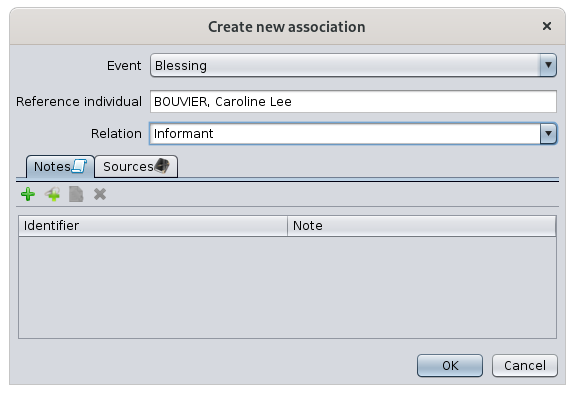
ThisListalistpowiązańofzawieraassociationswydarzeniacontainsosób,theweventsktórychofuczestniczyłapeopleedytowanainosobawhichoraztherolęeditedtejindividualosobyhaswbeentychinvolved and the role of the edited individual in these events.wydarzeniach.InNathepowyższymexampleprzykładzie,above,zakładając,ifżeweedytowanąassumeosobąthat the individual referenced being edited is calledjest Jacqueline Bouvier,thisoznaczameansto,thatże Jacqueline Bouvierwasbyławitnessświadkiemof Caroline Lee's blessing (and not thatbłogosławieństwa Caroline Leewas(ainformantnieofże Caroline Lee była informatorem błogosławieństwa JacquelineBouvier's blessing)Bouvier).TheWymienioneassociationstutajlistedpowiązaniaherezostałyhavewięctherefore been added:dodane:EitherAlbobyprzyusingpomocytheprzyciskuAssociatePowiążaosobępersonztotymthis eventwydarzeniembuttonwon thezakładceEventSzczegółyDetailswydarzeniatabosobyof the associated person.powiązanej.InWthepowyższymexampleprzykładzie,above,edytującit is therefore by editing the individualosobę Caroline Lee,selectingwybierającherwydarzenieblessingjejevent,błogosławieństwa,clickingklikająconprzyciskthepowiązania,associationwybierającbutton, choosing the individualosobę Jacqueline Bouvierandispecifyingwskazując "Informant"Informator".

EitherAlbobyprzyusingpomocytheprzyciskuAddDodajAssociationpowiązaniebuttonwintejthis tab:zakładce:
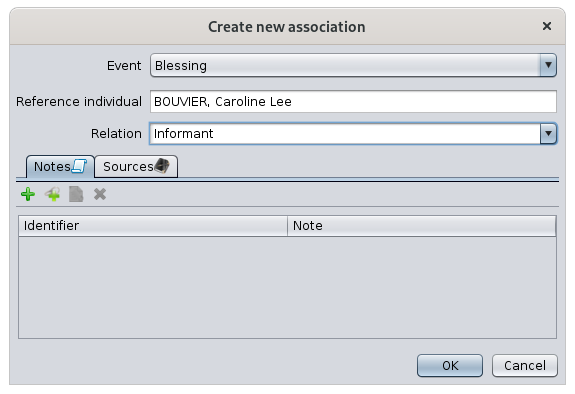
AsJakyouwidać,cantosee,toit'ssamotheokno,sameawindowzmieniaandsięonlytylkotheimięperson'sosoby.nameTochanges.więcItpunktispoczątkowythereforewskazujethenastartingsenspointudziałuthatjednejindicatesosobythewmeaningwydarzeniuof the involvement of an individual in the event of the other.drugiej.EitherAlbowezaczynamystartodfromwydarzenia,thektóreeventmiałothatmiejsce,tookiplace,szukamyandosobywe go and look for the individual involved,zaangażowanej,OrAlbowezaczynamystartodwithosobythezaangażowanejindividualiinvolvedwskazujemyandwydarzeniepointdrugiejout the event of the other.osoby.
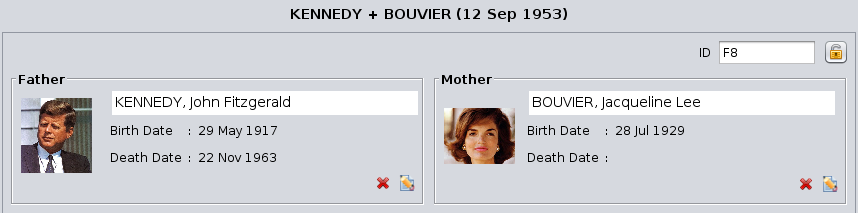
FamilyWpisEntityRodzinyWhenGdythewybranymselectedwpisementityjestisrodzina,a family, theEdytor AriesEditordzieliissiędividedpoziomohorizontallynaintodwietwoczęści:areas:opistheparydescriptionnaofgórzetheicouplewydarzeniaatoraztherelacjetop,rodzinneandnathedole,eventswand relationships of the family at the bottom, with tabs.zakładkach.DescriptionOpisof the coupleparyTheGórnaupperczęśćareajestisprzeznaczonadedicateddotoopisuthedwóchdescriptionosóbofztheaktualnietwowybranejindividualsparyof the couple currently selected inw Ancestris.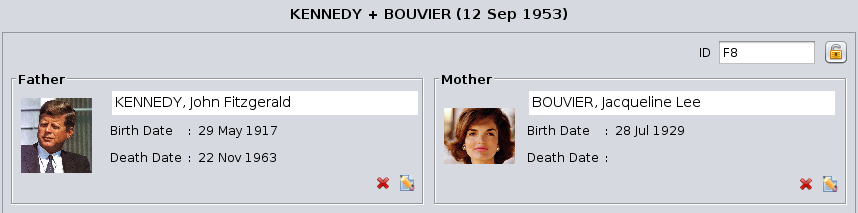
Numer ID
numberBeforePrzedtheparą,couple,watprawymthegórnymtoprogu,right,wyświetlanythe familyjest numer IDnumberis displayed.rodziny.PrivacyKłódkapadlockprywatnościThereJestisrównieżalsoprzyciska Padlock buttonKłódka .
. ItZaznaczamarksrodzinęthejakofamilypoufną,asjeśliconfidentialjestif pressed.wciśnięty.The coupleParaTheMążhusbandznajdujeissięonpothelewejleft and the wife on the right. For each of them there isstronie, adescription,żonawhichpocanprawej.beDlamodifiedkażdegowithzthenichModifyjestbutton:opis, który można zmodyfikować przyciskiem Modyfikuj:PhotoZdjęcieLastNazwiskoandifirst namesimięDateDataof birthurodzeniaDateDataof deathśmierci
DependingWonzależnościwhetherodthistego,descriptionczyisopisoccupiedjestbyprzypisanyandoindividualosoby,orpojawiająnot,siętheodpowiedniefollowing buttons appear.przyciski.ButtonsPrzyciskiThePrzyciskAdd buttonDodaj createstworzyanosobę,individual,mężczyznęmaleluborkobietę,female,abyindodaćorderjątodoaddwybranejhim/herrodziny.to- Pojawia
selectedsięfamily.
ThePrzyciskLink buttonPołącz allowspozwalayouwybraćtoosobęselectzthelistypersonosóbyoujużarezarejestrowanychlookingwforgenealogii.from- Pojawia
listsięoftylko,individualsgdyalreadywregisteredopisieinniethemagenealogy.
ThePrzyciskModify buttonModyfikuj modifiesmodyfikujetheopisdescriptionosobyofzthe couple's individual.pary. Ariesopensotwieratheoknoeditedycjiwindowosoby,forjakanopisanoindividual,powyżej.as- Pojawia
above.
ThePrzyciskDelete buttonUsuń removesusuwatheosobęindividualzfromrodziny.theNiefamily.usuwaItjejdoesznotgenealogii,deletetylkothezindividual,tejitkonkretnejsimplyrodziny.removes- Pojawia
fromsięthetylko,family.
him/herEventsZdarzeniaandirelationsrelacjewithzthe FamilyRodzinąTheDolnalowerczęśćareaoknaisjestdedicatedpoświęconaviapoprzeztabszakładkitozdarzeniomthewpisueventsRodzinaoforaztherelacjomFamilytejentity,rodzinyandztoinnymithe relationships of this family with other entities.wpisami.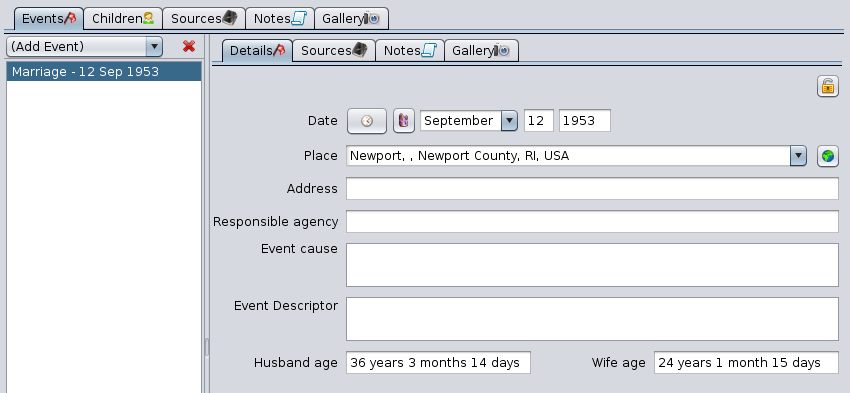
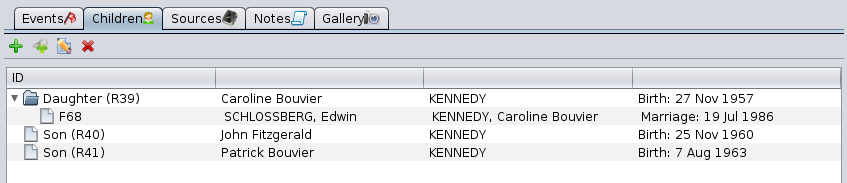
TheZakładkiEvents,Zdarzenia,Sources,Źródła,NotesNotatkiandiGalleryGaleriatabszostałyhaveopisanebeen described in thewIndividualsekcjisectionIndywidualnej.ChildrenZakładkaTabDzieciThisTatabzakładkamanageszarządzathedziećmichildrenwybranejofrodziny,theichselectedwspółmałżonkami,family,jaktheirrównieżrespectivedziećmi,spouses,któreasmiaływellzaskażdymthezchildren they have had with each of them.nich.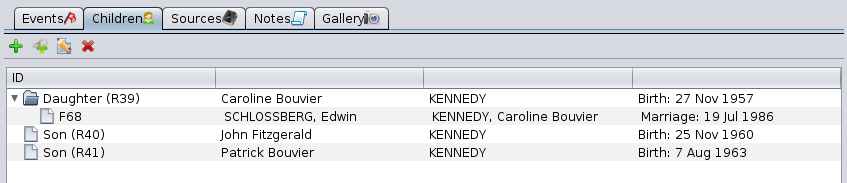
ThisZakładkatabtaismainformęthelistyformdrzewiastejofz przyciskami edycji i działa zgodnie z opisem we wspomnianych akapitach.Wpis Multimedialny
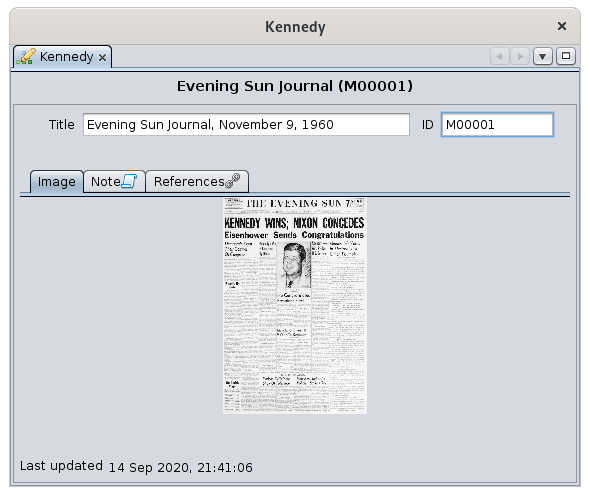
Gdy wybranym Wpisem jest wpis multimedialny, Edytor Aries wyświetla dokładną nazwę tego obiektu w polu Tytuł, a poniżej zakładki Obraz, Notatka i Odniesienia.
listZakładki Notatka
with theorazEdit buttonsOdniesieniaandsąworkswspólneasdladescribedwszystkichinWpisów.theSącorrespondingoneparagraphs.opisane na tej stronie.Zakładka Obraz
Wyświetla obraz powiązany z aktualnie wybranym nośnikiem.
Kliknięcie na obraz lub jego lokalizację umożliwia jego zmianę lub załadowanie innego.
Okno Proszę wybrać obraz, które się pojawi, prosi o wybór pliku odpowiadającego obrazowi do wyświetlenia.
Wpis Notatki
Gdy wybranym Wpisem jest wpis typu Notatka, edytor Aries wyświetla dwie zakładki.
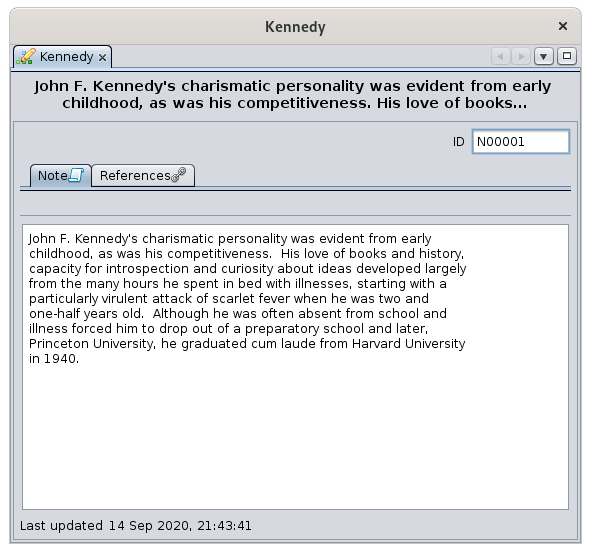
Na potrzeby demonstracji utworzono wpis notatki na podstawie właściwości notatki zawartej w przykładowym pliku Kennedy.
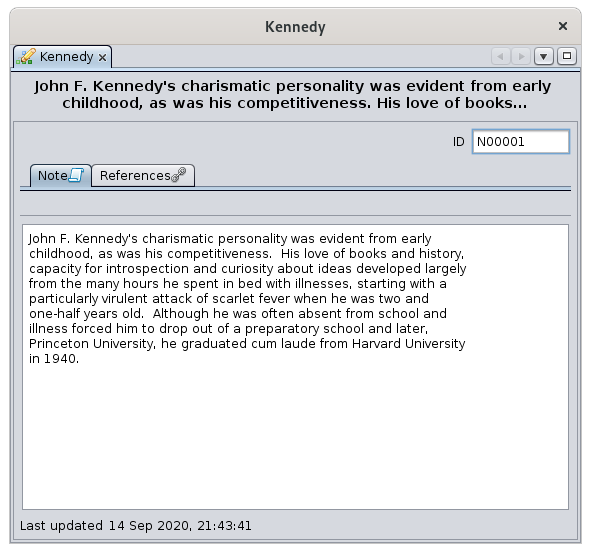
Zakładka Odniesienia jest wspólna dla wszystkich Wpisów. Jest opisana poniżej.
Zakładka tekstu notatki
Ta zakładka wyświetla treść tekstową wybranej notatki – do przeglądania lub edycji.
Nie należy mylić tej zakładki z zakładką Notatki wspólną dla innych Wpisów. Ta ostatnia służy do zarządzania powiązanymi notatkami, podczas gdy zakładka Notatki w Wpisie Notatka wyświetla treść samej notatki.
Wpis Źródło
Gdy wybranym wpisem jest źródło, Edytor Aries wyświetla cztery pola opisujące źródło, a następnie kilka zakładek poniżej.
Zakładki Notatki, Referencje oraz Galeria są wspólne dla wszystkich wpisów. Charakteryzują źródło, ale ich użycie jest takie samo jak opisane w sekcji dotyczącej Osób.
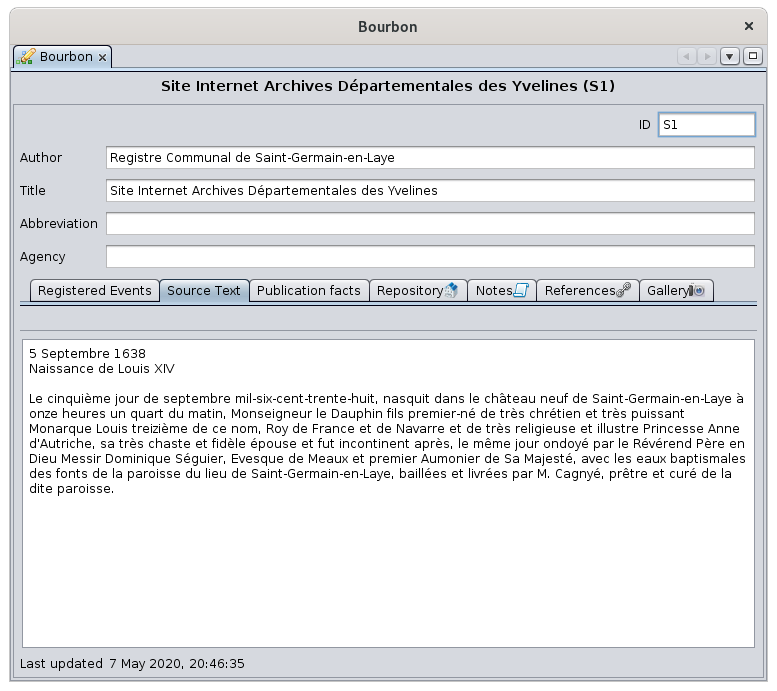
Opis źródła
- Autor: imię i nazwisko autora lub twórcy źródła.
- Tytuł: najważniejsze pole w rekordzie, ponieważ jest używane przez inne wpisy do odwoływania się do tego źródła.
- Użytkownik jest mocno zachęcany do wypełnienia tego pola w sposób bardzo precyzyjny i wystarczająco szczegółowy, aby można było zidentyfikować źródło bez ryzyka pomyłki.
- Skrót: skrócona nazwa źródła lub związanej z nim organizacji.
- Instytucja: osoba lub organizacja odpowiedzialna za zarządzanie źródłem.
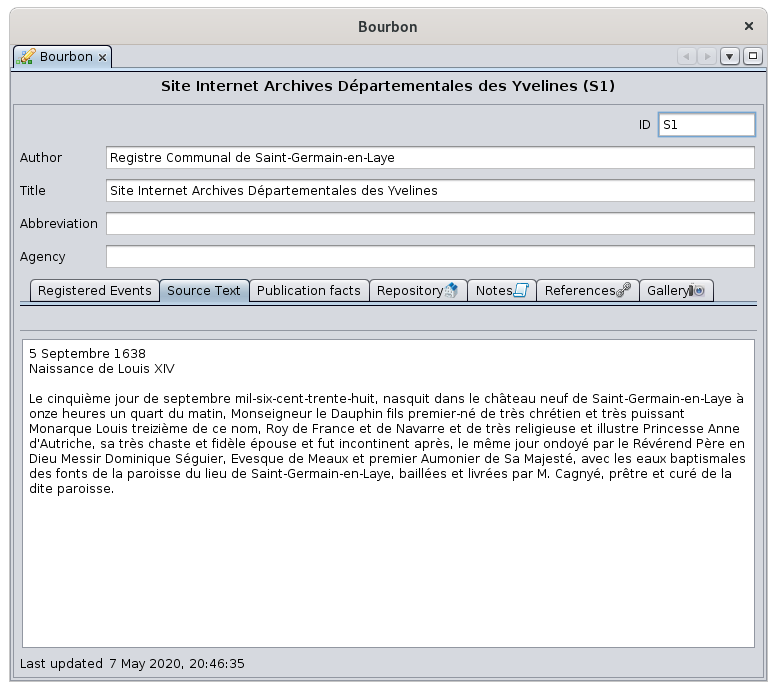
Zakładka tekst źródła
Ta zakładka umożliwia wprowadzenie lub modyfikację tekstu źródła takiego, jaki pojawia się w oryginalnym dokumencie lub nośniku fizycznym.
Jest on wyświetlany powyżej.
To zdecydowanie najistotniejsza informacja o źródle.
Zakładka repozytorium
Wskazuje repozytorium lub miejsce przechowywania zawierające aktualnie wybrane źródło. Może być tylko jedno repozytorium.
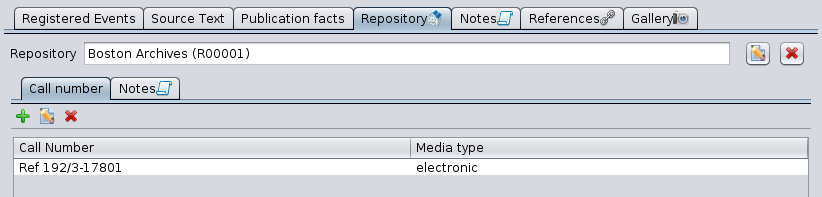
Ta zakładka wyświetla nazwę repozytorium, a następnie przyciski edycji:
- wybierz repozytorium za pomocą przycisku Dodaj repozytorium lub Połącz istniejące repozytorium
- edytuj
- usuń
Przyciski pojawiają się w zależności od sytuacji i działają zgodnie z opisem w odpowiedniej sekcji.
Przyciski wyboru lub modyfikacji repozytorium
Należy wskazać dokładnie jedno repozytorium, aby zlokalizować wybrane źródło.
Podczas tworzenia lub modyfikacji repozytorium pojawia się okno edycji repozytorium. Omówimy je w sekcji Wpis repozytorium poniżej.
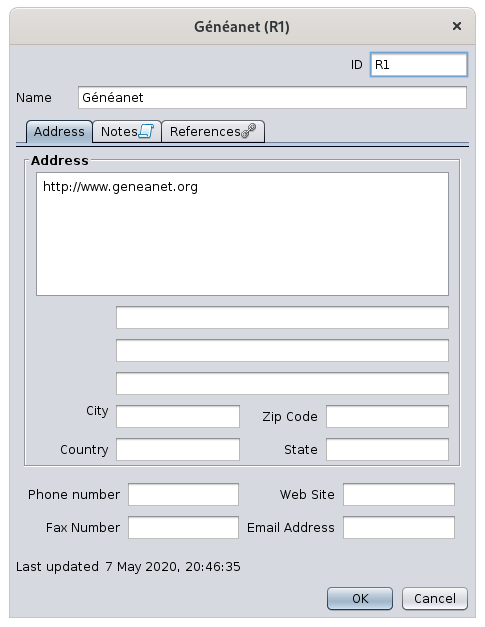
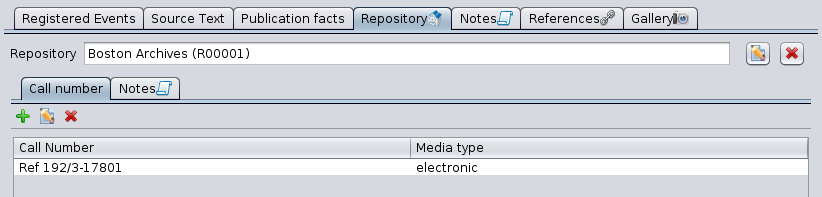
Po wypełnieniu repozytorium pojawiają się dwie zakładki: Numer katalogowy oraz Notatki.
Zakładka Notatki jest wspólna dla wszystkich wpisów. Tutaj określa powiązanie źródła z repozytorium, ale jej użycie jest takie samo jak opisano w sekcji osoby.
Zakładka numeru katalogowego
Zakładka Numer katalogowy zawiera listę różnych odwołań i typów mediów używanych w repozytorium do konkretyzacji źródła w tym repozytorium. Przykład: numer katalogowy Ref 192/3-17801 dla rejestrów parafialnych w archiwum regionalnym, w formacie elektronicznym.
Dla każdego elementu źródła, jeśli jest ich kilka, należy podać nazwę numeru katalogowego oraz typ nośnika (audio, karta, elektroniczny, film, gazeta, książka, czasopismo, rękopis, zdjęcie, nagrobek, wideo itd.).
Użyj przycisków edycji aby dodać, edytować lub usunąć linię numeru katalogowego / typu mediów.
Zakładka zarejestrowanych wydarzeń
Ta zakładka pozwala opisać listę różnych wydarzeń w wybranym źródle.

Dla każdej daty i lokalizacji wspomnianej w źródle, należy wymienić rodzaje wydarzeń, które miały miejsce tego dnia w tym miejscu.
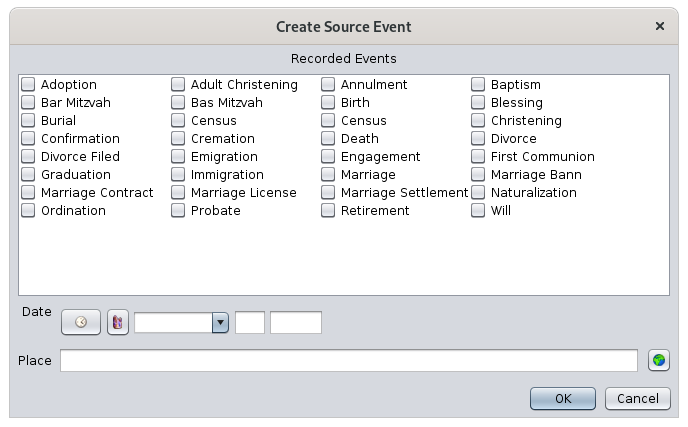
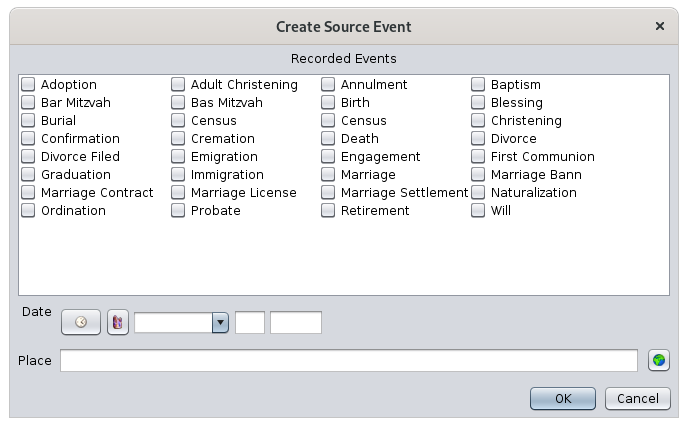
- Przycisk Utwórz wydarzenie źródła tworzy nowy wiersz. Otwiera okno pozwalające zdefiniować wydarzenia dla danego miejsca i daty.
-
- Zaznacz odpowiednie wydarzenia
- Wprowadź datę tych wydarzeń
- Wprowadź lokalizację tych wydarzeń
- Przycisk Edytuj wydarzenie źródła otwiera to samo okno do edycji informacji.
Zakładka danych publikacji
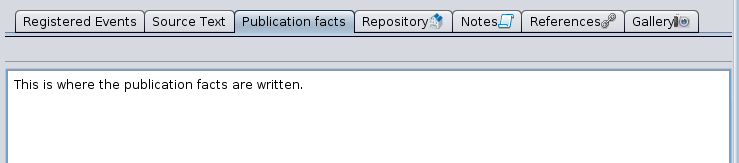
Ta zakładka umożliwia podanie szczegółów dotyczących publikacji źródła, przynajmniej gdzie i kiedy zostało utworzone.
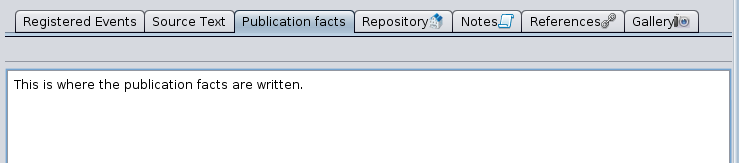
Informacje te wprowadza się jako tekst dowolny.
Dla źródeł opublikowanych należy wskazać miasto publikacji, nazwę wydawcy oraz rok publikacji.
Dla źródeł nieopublikowanych należy wskazać datę i miejsce utworzenia źródła.
MultimediaWpisEntityWhen the selected entity is a multimedia entity, the Aries Editor displays the exact name of this object in the Title field and, below it, the Image, Note and References tabs.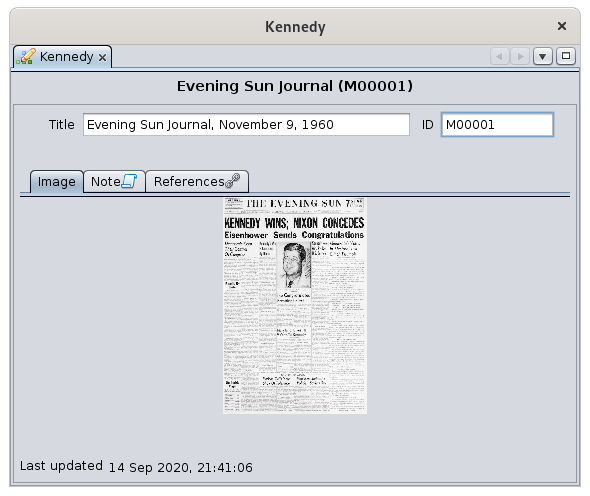
TheNoteandReferencestabs are common to all entities. They are described in this page.Image TabIt displays the image associated with the currently selected media.Clicking on the image or on its location modifies it or loads another one.ThePlease choose an imagewindow that appears prompts you to choose the file corresponding to the image to be displayed.NoteEntityZgłaszający
orazWhenKiedythewybranymselectedwpisementityjestiswpisaZgłaszającego,Note entity, theEdytor ArieseditorwyświetladisplaysopistwoZgłaszającegotabs.Fortrzythezakładkipurpose of the demonstration, we have created a note entity out of the note property provided in the Kennedy file example.TheReferencestab is common to all entities. It is described below.Note text tabThis tab displays the text content of the selected note, for consultation or for modification.This tab should not be confused with the common Notes tab present in the other entities. Indeed, the latter is used to list and manage the notes associated with these entities, while the Notes tab of the Notes entity displays the value of the note itself.Source EntityWhen the selected entity is a source ensity, the Aries Editor displays four fields describing the source and then a few tabs underneath.TheNotes,ReferencesandGallerytabs are common to all entities. They characterize the source but their use is the same as described in the Individual section.Description of the SourceAuthor: this is the name of the author or creator of the source.Title: this is the most important field in the record, since it is the one used by other entities to refer to it.Consequently, the user is strongly encouraged to fill in this field in a very precise and sufficiently detailed manner, so that the source can be identified without risk of confusion.
Abbreviation: this is the abbreviation of a source, or an organization associated with it.Agency: is the person or organization responsible for managing that source.
Source Text TabThis tab lets you enter or modify the source text as it appears on the original document or physical support.It is displayed above.It is by far the most useful information of the source.Repository tabIt indicates therepositoryor storage location containing the currently selected source. There can only be one repository.This tab displays the name of the repository, followed by theEdit buttons:select the repository with theAdd repositorybuttonorLink existing repositorybuttoneditdelete it
Buttons for selecting or modifying the repositoryOne - and only one - repository must be indicated in order to locate the selected source.Whether you are creating or modifying a repository, the following window for editing a repository appears. We will see it in theRepository Entitysection below.Once the repository is filled in, two tabs,Call numberandNotes, appear underneath.TheNotestab is common to all entities. It characterizes here the attachment of the source to the repository, but its use is the same as the one described in the individual section.Call number tabTheCall numbertab lists the different references and media types used in the repository to specifically identify the source in that repository. Example: call number referenced Ref 192/3-17801 for parish registers in a regional archive building, in electronic format.For each item in the source, if there are several, indicate the name of the call number and the type of media (audio, card, electronic, card, film, newspaper, book, magazine, manuscript, photo, tombstone, video, etc.).Use theEdit buttonsto add, edit or delete a call number / media type line item.Recorded Events tabsThis tab lets you describe the list of different events in the selected source.For each date and location mentioned in the source, it consists listing the types of events that took place on that date at that location.The Create Source Event buttoncreates a new row. It opens a window that allows you to define events for a given place and date.
Check the corresponding eventsEnter the date of these eventsEnter the location of these events
TheEdit Source Eventbuttonopens the same window for editing the information.
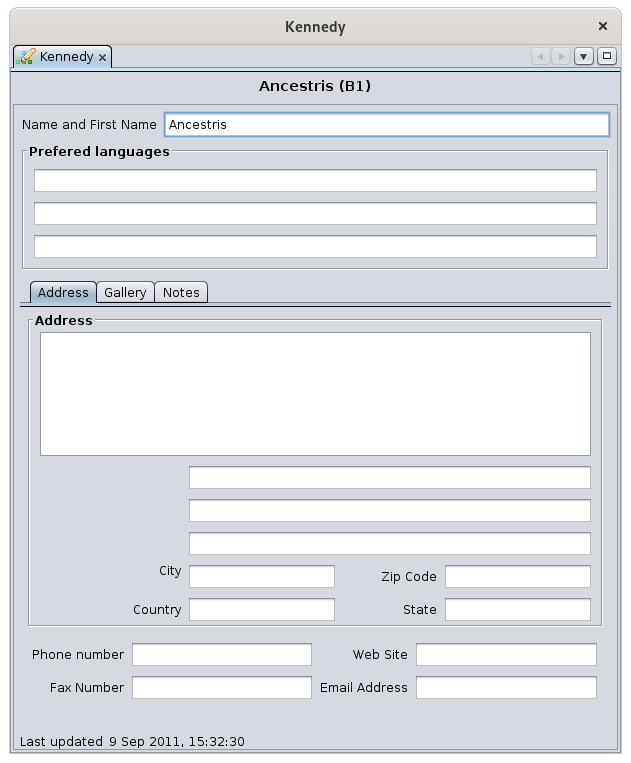
Publication data tabThis tab allows you to indicate the publication details of the source, at least where and when the source was created.These indications are made by entering a free text.For published sources, the city of publication, the name of the advertiser, and the year of publication must be indicated.For unpublished sources, the date and place of the source must be indicated.Submitter EntityWhen the selected entity is a submitter entity, the Aries Editor displays the description of the submitter and three tabs underneath.poniżej.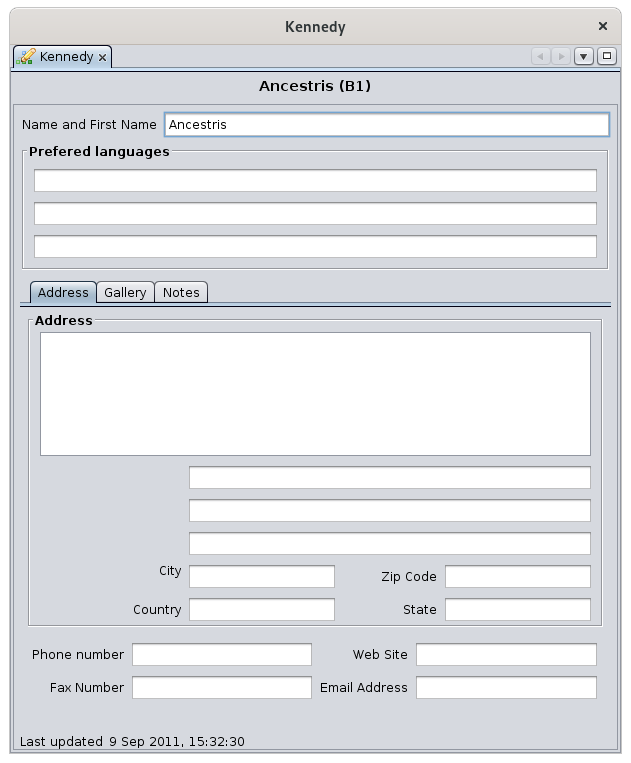
ThePierwszefirstpole,field,ImięNameiandNazwisko,Firstwskazujename,tożsamośćindicatesosobytheprzekazującejidentity of the information submitter.informacje.TheTrzythreepolafieldsponiżejbelowpozwalająallowwprowadzićyoutrzytopreferowaneenterjęzykithetegothree preferred languages of this submitter.submittera.TheZakładkiGalleryGaleriaandorazNotesNotatkitabssąarewspólnecommondlatowszystkichallwpisów.entities.CharakterystykaTheySubmitteracharacterizeInformacjithejestInformationtuSubmitterumieszczona,here,alebutichtheirużycieusejestistakiethesamosamejakasopisanedescribedwinsekcjithedotyczącejIndividual section.Osób.TheZakładkaAddressAdrestabjestisużywanausedtakinsamothejaksamezakładkawaydlaas the tab for a Repository.RepositoryWpisEntityRepozytoriumWhenKiedythewybranymselectedwpisementityjestisrepozytoriumalubrepositorylokalizacjaorprzechowywania,storage location entity, theedytor Arieseditorwyświetladisplaysnastępującethe following window:okno: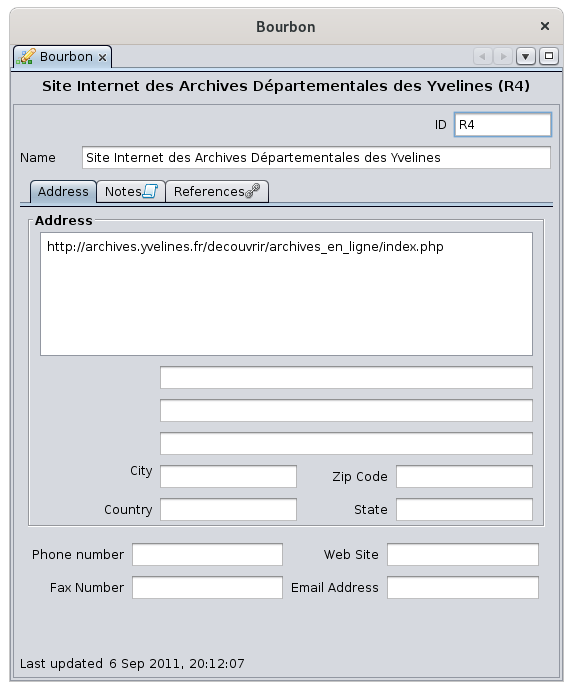
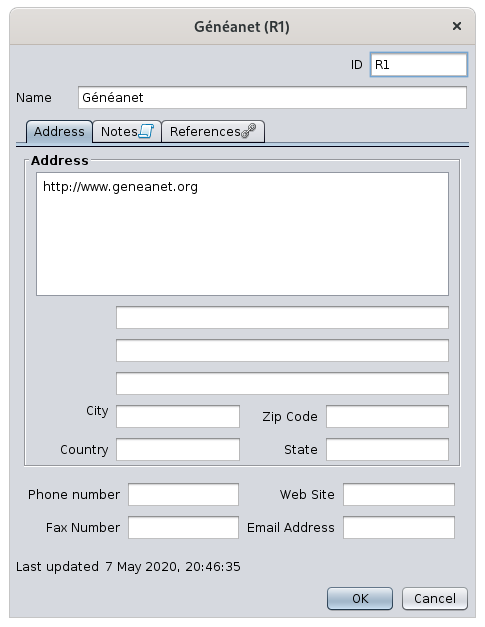
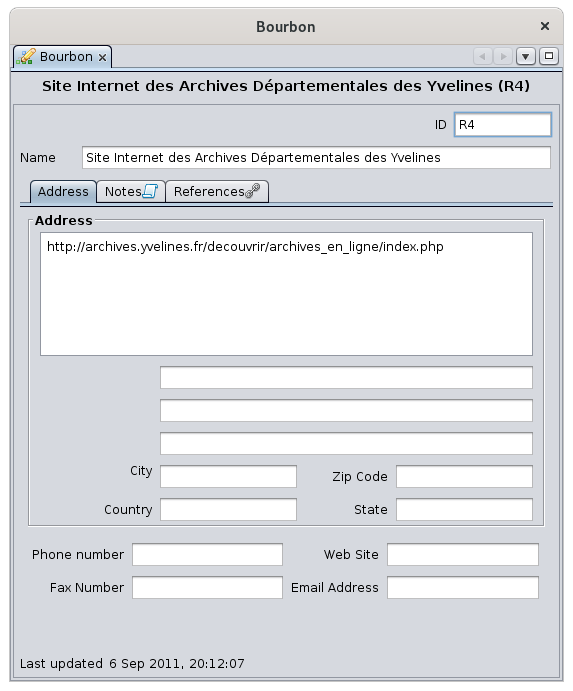
YouWenterpolutheNazwaexactwpisujesznamedokładnąofnazwęthistegorepositoryrepozytorium,inatheponiżejNametrzyfield,zakładkiandAdres,underneath,NotatkithreeitabsOdniesieniaAddress,pozwalająNotesuzupełnićand References allow you to complete the description.opis.TheZakładkaNotesNotatkitabjestiswspólnacommondlatowszystkichallwpisów.entities.CharakterystykaItrepozytoriumcharacterizesznajdujethesięrepositorytutaj,here,alebutjejitsużycieusejestistakiethesamo,samejakasopisanethatwdescribedsekcjiindotyczącejthe Individual section.Osób.AddressZakładkatabAdresItPozwalaallowsnayouwpisanietodokładnegoenteradresuthe precise adress of the repository.repozytorium.ItPrezentujepresentspolatheklasycznegofieldsformularzaof a classic address formadresowego (zipkodcode,pocztowy,city,miasto,country,krajetc.itp.).SeeZobaczpicture.ilustrację.YouMożnacanrównieżalsowpisaćenterdanethe Internet detailsinternetowe (adres e-mailaddressiandstronęwebsite)internetową)asorazwellnumeryas telephone numbers.telefonów.ReferencesZakładkatabOdniesieniaThePanelReferencesOdniesieniapanelmais in the form of aformęselectionlistylistwyboruwithzthreetrzemacolumns.kolumnami.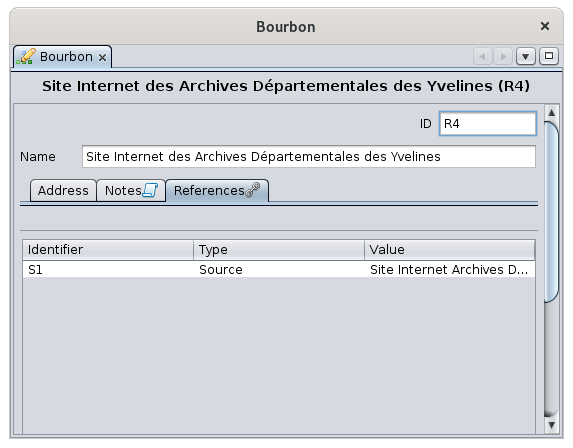
TheWtabletabelilistsznajdująallsięthewszystkiesourcesźródła,thatktóreusekorzystająthiszrepository.tego repozytorium.ThisZakładkaReferencesOdniesieniatabjestistakżealsoużywanausedwininnychothersytuacjach,circumstances,dlaforinnychotherwpisówentitiesniżthanrepozytoria.forOgólnierepositories.rzeczSobiorąc,moretabelagenerally,jestthepowiązanatablezisdanymrelatedwpisemtoiawyświetlagivenwszystkieentity,wpisy,andktóreitkorzystająlistszalltegothedanegoentities that use that given entity.wpisu.-
TheKolumnaIdentifierIdentyfikator,column,którawhichwskazujeindicates thenumer IDnumberwpisuofkorzystającegothezentitydanegousing the given entitywpisu -
TheKolumnaTypeTyp,column,którawhichwskazujeindicateskategorięthe category of entitywpisu -
TheKolumnaValueWartość,column,którawhichwskazujeindicatesnazwęthe name of the entitywpisu (fornaexample,przykładfordlaanwpisuindividualosobyentity,będzieittowillimiębeithenazwiskonametejof the individual)osoby).
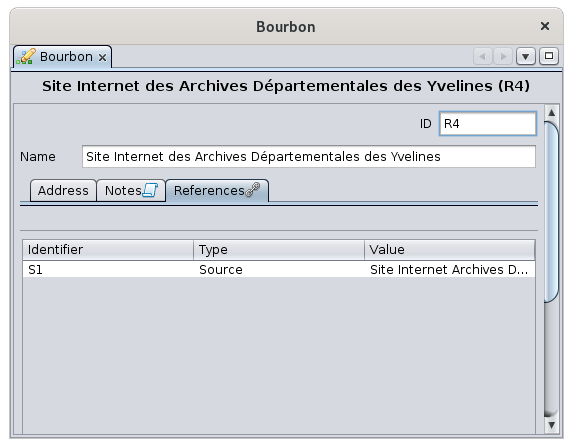
ThisTatableetabelaissłużyforwyłącznieinformationdoonly.informacjiIticannotniebemożeeditedbyćoredytowanamodified.ani modyfikowana.Examples :Przykłady:InNathepowyższymimageobrazieabove,edytowanetherepozytoriumrepositoryjestbeingużywaneeditedprzezis used by SourcesŹródła S1,namednazwane Site Internet Achives.IfJeśli rekord osoby I1 zawiera w swoim akcie urodzenia odnośnik do źródłarecord individual I1, contains in his birth certificate a link to a sourceS2,thistenentitywpis S2willpokażedisplaywinzakładceitsOdniesieniaReferencesliniętabodpowiadającąa line corresponding to the individualosobie I1.
WhenPrzedyouusunięciemarewpisuabouttakiegotojakdeleteplikanmultimedialny,entitynotatka,suchźródłoasczyarepozytorium,mediazdecydowaniefile,zalecanote,sięsourcenajpierworsprawdzić,repository,czyittabelaisOdniesieniastronglytegorecommendedwpisuthatjestyou first check that the References table of this entity is empty.pusta.WhenJeślithistabelatablenieisjestnotpusta,empty,usunięcieaspowodujedeletionzerwaniewillodnośnikówgeneratewpisów,aktórebrokenzlinkniegoofkorzystają,thedoentitieswpisu,usingktóryitjużtoniean entity that no longer exists.
CommonWspólneeditingelementycontrolssterujące edycjąTheNastępującefollowingelementycontrolssterującearesąusedużywaneinwtheEdytorze AriesEditorwinwieluseveral places.miejscach.SelectionListalistwyboruThisTalistlistaissłużyfordoconsultationprzeglądaniaandiselectionwyboruofwyświetlanychthe displayed data.danych.
SelectionWybór:apojedynczesimplekliknięcieclicknaonjednejonezofliniithejąlines selects it.wybiera.EditionEdycjawhengdythelinialinereprezentujerepresentswpis,anpodwójneentity,kliknięcieaotwieradouble-clickoknoopensedytoraanAriesariesdoeditoredycjiwindowklikniętegoto edit the entity clicked.wpisu.SortingSortowanie:columnnagłówkiheaderskolumncanmożnabekliknąć,clickedabytoposortować.sort.KolejneAkliknięcienewodwracaclickkierunekreverses the sort direction.sortowania.MovePrzesuwaniecolumnkolumn:thekolumnycolumnsmożnacanprzesuwaćbemyszą,movedklikającwithitheprzeciągającmousenagłówekbykolumny.clickingKolejnośćandkolumndraggingjestthezapamiętywanacolumnzheader.sesjiThenacolumn order is memorized from one time to the next.sesję.TreeListalistdrzewaThis is a list of individuals ordered in an certain way accordingJest tothelistagenealogicalosóbhierarchy.uporządkowanaItwhasokreślonyasposóbflapzgodnytozunfoldhierarchiąorgenealogiczną.foldMathezakładkębranches.do rozkładania lub składania gałęzi.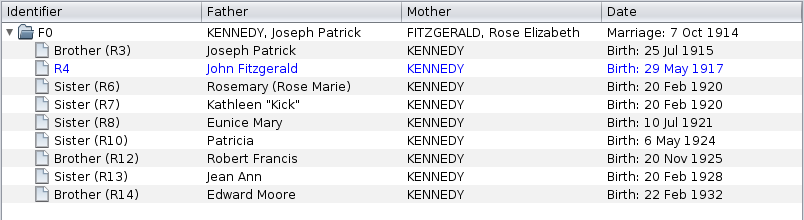
ThisTentypetypoflistylistwystępujeispodczaspresentedycjiforwpisówthe editions of the IndividualsOsób (SpousesZakładkiandMałżonkowieChildreniandDzieciParentsorazandRodziceSiblingsitabsRodzeństwo)andiFamiliesRodzin (ChildrenZakładkatabDzieci)entities..SelectionWybór:apojedynczesinglekliknięcieclickwybieraselects the line.linię.EditionEdycja:whengdythewierszrowreprezentujerepresentswpis,anpodwójneentity,kliknięcieaotwieradouble-clickoknoopensedycjian entity edition window.wpisu.SortingSortowanie:Thistalistlistaisnienotjestsortedsortowana,sinceponieważitzaburzyłobywouldtodisorganizestrukturęthe tree structure.drzewa.MovingPrzesuwaniecolumnkolumn:Columnskolumnycanmożnabeprzesuwaćmovedmyszą,withklikająctheimouseprzeciągającbynagłówekclickingkolumny.andKolejnośćdraggingkolumntheniecolumnjestheader.zapamiętywanaThezcolumnsesjiordernais not memorized from one time to the next.sesję.EditPrzyciskiButtonsedycjiThePrzyciskiEditedycjibuttonspozwalająallowtworzyć,youłączyć,tomodyfikować,create,usuwać,link,preferowaćmodify,dane.delete,Sąpreferużywanedata.wTheywiększościarekategoriiused by most categories of entities.wpisów.
ThesePrzyciskibuttonsteworkdziałająinwconjunctionpołączeniuwithzthelistąselectionwyborulistwyświetlanądisplayedponiżejbelownich.them.PojawiająTheysięappearwaccordingzależnościtoodthestatusustatus of the list.listy.AddPrzyciskButtonDodajThePrzyciskAddDodajbuttondodajeaddselementandoitemlistytowyboru,thetworzącselectiongolistodby creating it from scratch.podstaw.LinkPrzyciskButtonPołączThePrzyciskLinkPołączbuttondodajeaddselementandoitemlistytobezthetworzenialistgo,withoutłącząccreatinggoit,zbutjużlinkingistniejącymitwpisemtowspółdzielonymthewshared entity already existing in the genealogy.genealogii.EditPrzyciskButtonEdytujThePrzyciskEditEdytujbuttonpozwalaallowsmodyfikowaćyouwskazanyto modify the indicated item.element.DeletePrzyciskButtonUsuńThePrzyciskDeleteUsuńbuttonusuwadeleteswskazanythe indicated item.element.WhenGdytheelementitemjestiswpisem,anusunięcieentity,nietheusuwadeletionsamegodoeswpisu,notleczdeletetylkothepołączenieentityzitself, but the connection only.nim.FavoritePrzyciskbuttonPreferujThePrzyciskPreferPreferujbuttonwskazujedesignatesdomyślnethemedia,defaultktóremediamajątobyćbeużywane,usedjeśliifjestthereichare several.kilka.ThisTenbuttonprzyciskisjestonlyużywanyusedtylkofordlathemediówmedia of an individualosoby (Galleryzakładkatab)Galeria)andiissłużyuseddotowskazania,designatektórewhichzonenichshouldpowinnobebyćdisplayeddomyślniebywyświetlanedefaultwindrzewiethe dynamic tree.dynamicznym.- Pojawia
described- Pojawia
the- Pojawia
the- Pojawia
- Uwaga: to
an- Przykłady: