
Copie d'entités entre généalogies
ThisCet tooloutil helpsvous youaide à copycopier genealogydes individualsindividus andet complete familydes branches fromfamiliales onecomplètes genealogyd'une togénéalogie anotherà une autre.
FromÀ apartir maind'une entityentité ofprincipale yourde choice,votre thischoix, toolcet willoutil la copycopiera, l'attachera it,ou la attachfusionnera it,à orune mergeautre itgénéalogie toet aimportera differenttout genealogyou andpartie bringde alongl'arbre somegénéalogique orlié allà thecette familyentité treeprincipale.
Seule linkedl'entité toprincipale thatest mainattachée entity.ou Onlyfusionnée. theL'outil mainde entityfusion ispeut attachedêtre orutilisé merged.pour Thefusionner mergeles toolautres canentités beune usedfois to merge the entities brought along.importées.
ThisCette mainentité entityprincipale canpeut beêtre anyn'importe entityquel type,type and'entité, individual,un aindividu, family,une afamille, une note, aun media,média, etc.
IfSi des fichiers localmultimédias medialocaux filessont areliés linkedaux toentités thecopiées mainet entitydoivent andégalement areêtre tocopiés bedans copiedla asgénéalogie well to the receiving genealogy,réceptrice, Ancestris willproposera offerde tocopier copyégalement theces mediafichiers filesmultimédias aset wellde andles attachjoindre themcorrectement properlyaux toentités themultimédias newlynouvellement copied media entities. copiées.
ThisCet tooloutil alsovous letspermet youégalement alld'effectuer thetoutes aboveles withinopérations theci-dessus sameau genealogysein althoughd'une itmême makesgénéalogie, lessbien senseque tocela doait that.moins de sens.
ThisCet tooloutil isest accessible fromdepuis thele Toolsmenu menuOutils, whenlorsque usingvous utilisez le Drag-and-Dropglisser-déposer onsur anune entity,entité, andet fromdepuis thele Contextmenu menucontextuel d'une of an entity.entité.
Pre-requisitesPré-requis
BothLes genealogiesdeux mustgénéalogies bedoivent ofêtre thede la samemême version Gedcom version andet la version 7 isest necessarynécessaire whensi usingvous Associations.utilisez des associations.
Description
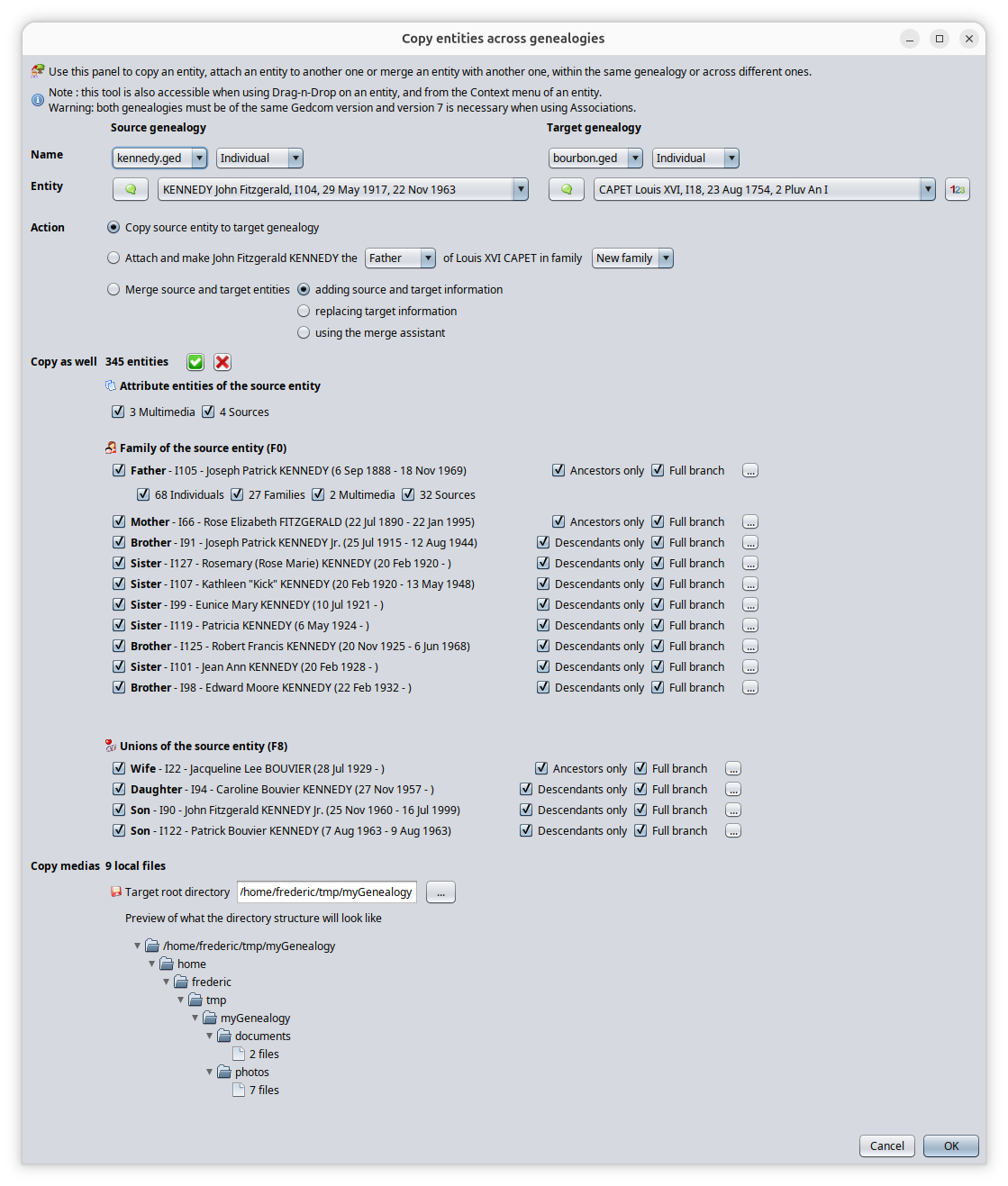
ThisCet tooloutil isest madeconstitué ofd'une oneseule single window.fenêtre.
TheLe principleprincipe ofde thel'outil toolconsiste isà to performeffectuer 4 steps.étapes.
1/ GenealogiesSélection anddes entitiesgénéalogies selectionet des entités : thiscela letsvous youpermet choosede achoisir firstune entitypremière fromentité adans genealogyune thatgénéalogie youque wantvous tosouhaitez extract,extraire, andet aune seconddeuxième entityentité toà whichlaquelle youvous wantsouhaitez tol'attacher attachou itla to or merge it to,fusionner,
2/ ActionSélection selection:de this lets you choose the l'action you: wantcela tovous execute,permet de choisir l'action que vous souhaitez exécuter, simple copy,copie, attachmentattachement orou merge,fusion,
3/ OtherSélection entitiesd'autres selection:entités : cela thisvous letspermet youde selectsélectionner alltoutes additionalles entitiesentités yousupplémentaires wantque tovous bringsouhaitez along,copier aussi,
4/ LocalFichiers mediamultimédias fileslocaux : thisc'est isici whereque youvous checkvérifiez the local media filesla structure whichdes willfichiers bemultimédias created,locaux qui sera créée,OnceUne done,fois youcela pressfait, vous appuyez sur OK topour letlaisser Ancestris dofaire alltout thele work.travail.
AtEn thehaut topde ofl'écran, thevous screensélectionnez youvos makegénéalogies youret genealogiesentités, anden entitiesdessous selection,vous belowchoisissez you choose the l'action, thenpuis youvous makesélectionnez yourles selectionautres ofentités theà othercopier, entitieset topen copy,bas andse attrouvent theles bottominformations issur theles informationfichiers aboutmultimédias locallocaux mediaconcernés filespar involvedla in the copy.copie.
Let'sDécrivons describe eachchaque section.
GenealogiesSélection anddes entitiesgénéalogies selectionet des entités
AtEn thehaut topde ofla thefenêtre windowapparaissent appeardeux two columns.colonnes.
OnÀthegaucheleftsehandtrouvesideceisquewhatnousweappelonscalliciherelathe«"Sourcegénéalogiegenealogysource"».ThisIliss'agitthedegenealogylafromgénéalogiewhichàyoupartirwantdetolaquelleextractvousinformation.souhaitez extraire des informations.OnÀthedroiterightsehandtrouvesideceisquewhatnousweappelonscalliciherelathe«"Targetgénéalogiegenealogycible"».TheIlgenealogys'agitintodewhichlathegénéalogieextracteddansinformationlaquellewilllesbeinformationsstored.extraites seront stockées.
TheLa targetgénéalogie genealogycible willsera mosttrès probablyprobablement bevotre yourgénéalogie. genealogy.La Thegénéalogie source genealogysera willtrès mostprobablement probablyune begénéalogie qui vous a genealogyété youfournie havepar beenun givenautre frommembre anotherde familyvotre memberfamille orou thatque youvous haveavez collectedrecueillie fromau yourcours research.de vos recherches.
ForDeux eachlignes genealogys'affichent arepour displayedchaque two lines.généalogie.
TheLafirstpremièrelinelignecontainsdeachaquelistcolonneboxcontientofunealllistethedéroulantegenealogiesdecurrentlytoutesopenlesingénéalogies actuellement ouvertes dans Ancestris.
YouVoususeutilisezthiscettelistlistetopourselectsélectionnerwhichquellegenealogygénéalogieisestthelaSource,sourceandetwhichlaquelleoneestislathe target.cible.ByPardefault,défaut,thelaselectedgénéalogie sourcegenealogysélectionnéeisestthelacurrentlygénéalogieselectedactuellementgenealogysélectionnéeatauthemomenttimeduoflancementlaunchingdethe tool.l'outil.ByPardefault,défaut,thelatargetgénéalogiegenealogycibleisestthecelleonequithatawasétéselectedsélectionnéepreviouslyprécédemmentindans Ancestris,orouthelasamemêmeonesiisuneonlyseuleonegénéalogiegenealogyestisouverteopen indans Ancestris.NextÀtocôtéthisdefirstcettelistpremièreboxlisteisdéroulanteanotherselisttrouveboxuneofautretheliste déroulante des typesofd'entitésentitydeinlathegénéalogieselected genealogy.sélectionnée.ByPardefaultdéfaut,arelesselectedtypesthed'entitéstypeactuellementofsélectionnésthedanscurrentlylesselectedgénéalogiesentitiesrespectivesinauthemomentrespectivedugenealogieslancementatdethel'outiltimesontof launching the tool.sélectionnés.
- La
Thedeuxièmesecondlignelinecorrespondisauthesélecteurentityd'entitésselectorque vous utilisez dans d'autres parties d'Ancestris.you use in other parts of Ancestris.
ItElleletsvousyoupermetsortdethetrierlistlaoflisteentitiesdesandentitéschooseetthede choisir l'individu DeCujusindividualsiifIndividuIndividualestis thele typeofd'entitéentitysélectionnéselectedci-dessusaboveetandsiiflathegénéalogiegenealogycomportehasunaindividu DeCujusindividual defined.défini.ByPardefaultdéfaut,thelesselectedentitésentitiessélectionnéesaresontthecellesonesquicurrentlys'affichentshowingactuellementindanstheles éditeurs Ancestriseditorsauatmomentthedutimelancementofdelaunching the tool.l'outil.
WhenLorsque wenous indicateindiquons "Source"l'entité entity« inSource this» dans cette page, thisil iss'agit thede selectedl'entité entitysélectionnée ofdans thela sourcegénéalogie genealogy.source. ItIl isne nots'agit necessarilypas annécessairement entityd'une ofentité de type "Source"« Source ».
YouVous canpouvez seevoir alltout thatcela indans the l'image above.ci-dessus.
TheLa généalogie sourcegenealogysélectionnéeselectedestislathegénéalogieKennedyKennedy.genealogy.LaThegénéalogietargetciblegenealogysélectionnéeselectedestislathegénéalogieBourbon genealogy.Bourbon.ForPourboth,lesthedeux,Individualle typeisIndividuselected.estAssélectionné.aParconsequence,conséquent,thelesentitysélecteursselectorsd'entitésindethelaseconddeuxièmelineligneareaffichentdisplayinglesIndividuals.individus.InDansthelesselectors,sélecteurs, John Kennedyandet Louis XVIaresontselected.sélectionnés.ForPourtheleBourbonsélecteurentityd'entitéselector,Bourbon,wenouscanpouvonsseevoirthele bouton DeCujus"123"«button123because» car une numérotation Sosa aSosaéténumberingcrééehasdansbeenlacreatedgénéalogiein the Bourbon genealogy.Bourbon.
OfBien coursesûr, thereil isn'y noa reasonaucune inraison realdans lifela tovie putréelle inde themettre sameles genealogyKennedy Kennedyset andles Bourbons,Bourbon dans la même généalogie, mais il est plus facile de voir ce qui se passe dans l'outil en prenant ces exemples.
Veuillez noter que les 3 listes de chaque côté (généalogie, type d'entité et entités) sont interdépendantes.
- Lorsque vous modifiez la sélection de généalogie, le type d'entité et l'entité sont mis à jour
- Lorsque vous modifiez le type d'entité, l'entité est mise à jour
Veuillez également noter que toutes les informations figurant dans le reste de la fenêtre dépendent de ces 6 sélections. Lorsque vous modifiez l'une des six sélections, le reste de la fenêtre ci-dessous est mis à jour.
Sélection d'action
Trois actions sont possibles et elles dépendent des généalogies et entités sélectionnées ci-dessus.
Quelle que soit l'action choisie, une copie des entités d'une généalogie à l'autre sera effectuée. Ce choix a donc pour but itde ispréciser easiersi tola seecopie what'doit être enrichie d'un rattachement entre entités happeningou ind'une thefusion toolde whenl'entité contrastingprincipale the differences.sélectionnée.
Please
Copier
Cette theaction 3indique listsà onAncestris, eachlorsque sidevous (genealogy,cliquez entitysur typeOK, andde entities)simplement arecopier dependingdepuis onla eachgénéalogie other.-source Whenvers changingla thegénéalogie genealogycible selection,l'entité thesélectionnée entitydans typele andsélecteur entityd'entités areet updated-toutes Whenles changingentités thesélectionnées entityen type, the entity is updateddessous.
PleaseIl notes'agira asd'une wellsimple thatcopie. allAucun therattachement informationni inaucune thefusion restd'aucune ofsorte thene windowsera depends on these 6 selections. When changing any of the six selections, the rest of the window below is updated.
Action selection
Three actions are possible and depend on the selected genealogies and entities above.effectuée.
InSi allla cases,simple copie est votre intention, l'entité cible sélectionnée n'a copyaucune willimportance beet performed.vous Thepouvez choiceconserver tola makesélection ispar todéfaut.
Copy
This action tells Ancestris, when pressing OK later, to simply copy from the Source genealogy to the Target genealogy the entity selected in the entity selector and all the entities selected below.
This will be a simple copy. No attachment nor mege of any sort will be done.
If this action is your intention, then the target entity selected has no importance and you can leave the default selection.
AttachRattacher (= CopyCopier andet Attach)Rattacher)
ThisCette action tellsindique à Ancestris, whenlorsque pressingvous OKcliquez later,sur toOK, performd'effectuer thela same copymême action asde abovecopie que ci-dessus et anden toplus alsode attachrattacher thel'entité Sourcesource entityà tol'entité thecible Targetune entiyfois afterla thecopie copy has been made.effectuée.
YouVous canpouvez prettyrattacher muchpratiquement attachn'importe anyquelle entityentité toà anyn'importe other.quelle autre. Ancestris willadaptera adaptla thelogique logicde of the attachment.l'attachement.
IfSiyouvousattachassociezanunindividualindividutoàanotherunindividual,autremanyindividu,possibilitiesplusieursarepossibilitésavailable.s'offrentTheyàarevous.listedEllesbelowsontinrépertoriéesthedanstable.le tableau ci-dessous.IfSiyouvousattachassociezaunrepositorydépôttoàaune source,onlyuneoneseulepossibilitypossibilitéexists.existe.
ToPour accomodatetenir allcompte possibilities,de thetoutes Attachles possibilités, l'action includeRattacher somecomprend additionalcertains parametersparamètres yousupplémentaires willque havevous todevrez select.sélectionner.
TheLerolerôleofdethelaindividualpersonneattachedrattachéefromduthepointperspectivedeofvuethedepersonlaitpersonneisàattachedlaquelletoelle est rattachée (père, époux, etc.)TheLafamilyfamilleindanswhichlaquelleyouvousmakeeffectuezthisceattachmentrattachementTheL'eventévénementtoauquelwhichvous rattachezyouunattachmédia,a media, aune source,aune note, etc.TheLa sourcetoàwhichlaquelleyouvousattachrattachezaunrepositorydépôtinsicasevousyousélectionnezselectuneanpersonneindividualcommeasentitéthe target entity.cible.

InDans the l'image above,ci-dessus, youvous canpouvez seevoir theque rolele selectionrôle tosélectionné beest "son"« andfils the» familyet selectedque beingla "famille sélectionnée est «CAPET x MEDICIS (F11)».
DependingEn onfonction whichde entityl'entité youque attachvous toassociez whichà otherune entity,autre theentité, textle oftexte thede l'action andet theles availableparamètres parametersdisponibles arevous automaticallysont providedautomatiquement tofournis you bypar Ancestris. WithLe thetableau theci-dessous tablevous below,permettra youde willcomprendre understandl'intérêt thede purposechoisir ofces having to choose these parameters.paramètres.
TheLes choiceschoix providedqui tovous yousont alsoproposés dependdépendent onégalement whetherde thela attachmentpossibilité ou non d'effectuer l'action isde possiblerattachement. orSeuls not.les Onlyrattachements possiblepossibles attachmentssont are proposed.proposés.
TheLesattachementpossibilitéspossibilitiesdearerattachementlimitedsonttolimitéestheauxpossibilitiespossibilitésofferedoffertesbyparthelaGedcomnormestandard.Gedcom.TheLesattachementpossibilitéspossibilitiesdearerattachementalsosontlimitedégalementbylimitéestheparavailabilitylaofdisponibilitésuchdeattachmentceinrattachementthedanstargetlagenealogy.généalogieForcible.instance,Paryouexemple,cannotvousattachneapouvezpersonpasasrattachertheunefatherpersonneofenanothertantpersonqueinpèread'unegivenautrefamilypersonneisdanstheunefatherfamilleisdonnéealreadysidefinedleinpèrethisestgivendéjàfamiy.définiYoudanswouldcettehavefamille.toVousindicatedevreztoalorsmakeindiqueritqu'ilthes'agitfatherduinpèreanotherdansfamily,unepotentiallyautreafamille,newéventuellementone.une nouvelle.
HereVoici isle thetableau tablede oftoutes allles thecombinaisons possibled'attachement attachmentpossibles.
| Note | Source | |||||||
|
- Parent, - Alias |
- | - | - | - | - | |||
| - | - | - | - | - | - | |||
| Note | Rattacher
|
Note |
||||||
| - | - | - | - | |||||
| Source | Source |
Source |
- | - | - | |||
| - | - | - | - | |||||
| - | - | - | - | - | - | - | ||
Merge (= Copy and Merge)
This action tells Ancestris, when pressing OK later, to perform the same copy action as above and to also merge the Source entity to the Target entiy after the copy has been made.
This action is only possible if both entities are of the same type.
Another choice is to be made here. This is the way you want to perform the merge. You have 3 possibilities.
- Adding - Merge by adding the information of the source entity to the target entity.
- Replacing - Merge by replacing the information of the target entity by the information of the source entity when there is a conflict.
- Assistant - Merge using the Merge Assistant. You will decide on a case by case basis what to do with the conflicting information. The merge assistant will be displayed after the copy is completed.
Copy as well other entities selection
Depending on the selections above, a number of entities are likely to be brought along the transfer from the Source genealogy to the Target genealogy.
You have the possibility to select very precisely which entity you want to include in the copy action.
Other entities are displayed in several possible groups.
Attribute entities of the source entity
Attributes are non individual nor family entities, so they are notes, medias, sources, repositories and submitters.
Ancestris displays the available attributes of the source entity, and how many of them are.
This section applies to any type of entity source selected.
If you leave the mouse over the attribute type, Ancestris will disply the list in the tool tip.
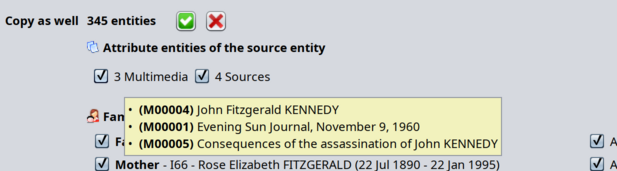
In the image above, to include the 3 multimedias in the copy, leave the chech box selected. To exclude them, unselect it.
If you select or unselect a check box, the total number of entities being copied is updated. This number does not include the source entity which is always copied.
In the image above, we can see that the source entity, in this case the individual entity "John Fitzgerald Kennedy", does not have any Note entity attached to it. So the Note box does not appear.
Family of the source entity
In this section, you can see and select individuals of the parent family of the source individual selected.
It is only displayed if the source entity is of type Individual and if this person has a family of biological parents in the source genealogy.
Here is an example of what you will see.
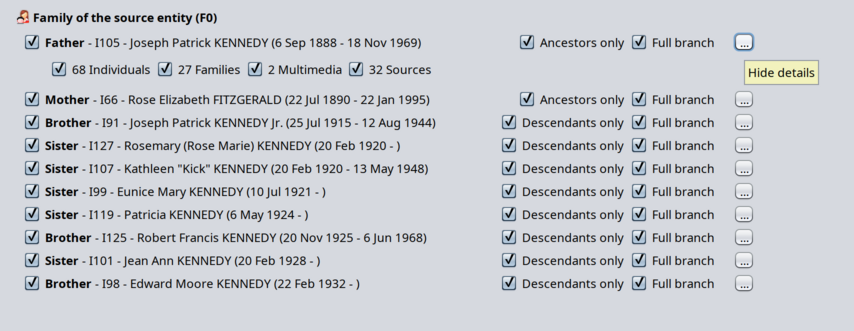
You will see the family members from the perspective of the source individual: father, mother, brothers, sisters.
The source individual is not displayed again here.
Scope
For each person, you wil see the attribute entities if you press the "Show details" button on the right hand side of each person. In the image above, details are displayed for the father.
For each person, you will have the possibility to include the ancestors or descendants of that person. You can choose between 2 types of scope here.
- Ancestors only (for the ascendants of the source individual) / Descendants only for the descendants of the source individual) : only direct ancestors or direct descendants are included. Direct in the sense of "blood related", SOSA related.
In this case, spouses of descendants and siblings of ancestors are not included. - Full branch: this will tell Ancetris to include the whole family group of the person in the copy action. So spouses of descendants and siblings of ancestors will be included in that case.
When ancestors, descendants or branches are included in the copy, Ancestris will add the corresponding entities in the details shown.
In the image above, we can see that the full branch of the Father of the source individual includes 68 individuals and 27 families, as well as 2 multimedias and 32 sources.
You can choose to unselect Multimedia and sources, but you cannot unselect 68 Inddividuals nor 27 families. To exclude them from the copy, just unselect "Ancestors only".
Note: if you select "Full branch", it will automaticaly select "Ancestors only". If you unselect "Ancestors only", it will unselect "Full branch", because one scope is included in the other scope.
Person displayed as disabled
Sometimes, a person could appear as disabled. Here is an example where Father and Mother are displayed as disabled.
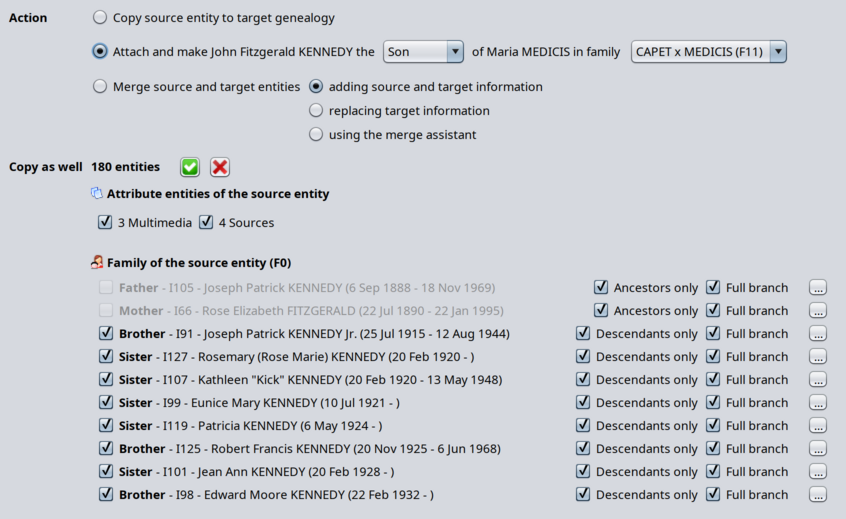
A person appears as disabled and will be excluded from the copy if it cannot be copied based on the action and parameters selected.
In the image above, we can see the action is to attach John Kennedy as son of Maria Medicis in the CAPET X MEDICIS family.
If the attachment is successful, John's parents will be Henri IV and Maria de Medicis. So the source parents, Joseph Kennedy and Rose Fitzgerald cannot also be the parents of John in the target family. Hence Ancestris disables that possibility.
If you really want to bring Joseph and Rose along in the copy action, you would have to choose a "new" family in the family list box.
Non biological families of the source entity
According to the same principle as the parent family, Ancestris will also display in this section all the found non biological families of the source individual.
It is only displayed if the source entity is of type Individual and if this person has non biological parents in the source genealogy.
Unions of the source entity
According to the same principle as the parent family, Ancestris will also display in this section all the found unions of the source individual.
It is only displayed if the source entity is of type Individual and if this person has unions in the source genealogy.
Aliases of the source entity
This section lists all the aliases of the source individual.
It is only displayed if the source entity is of type Individual and if this person has aliases in the source genealogy.
Local Media files
This section lists all the medias files involved in the selected entities above.
It is only displayed if both genealogies are different, if entities of type media/multimedia are included in the copy and if they themselves refer to local media files.
Reminder: media files are regular image, videos, sound, etc. files that are linked to the Gedcom genealogy data using file addresses called file paths.
Each piece of genealogy data that needs to reference a Media uses a FILE property in Ancestris to store the file path to the media file. This helps Ancestris find the file and display it.
If some of the entities you copy across are Media entities, you will want the corresponding files to be stored among your other media files of the target genealogy.
- For remote files, those using a web address, you may decide to leave the files remotely, or to download them. Either way, we suggest you to use the Ancestris Media manager after the entities are copied across. The media manager includes a tool to download remote files. In the tool described in this page, Ancestris will not alter their path and will copy them leaving the file path unchanged.
- For local files, those using a local file path, Ancestris will make a copy of the media files and store them in a directory of your choice - the target root directory - and modify the file path accordingly.
Choice of target root directory for copied Media files
You have to indicate one target directory to store the media files of the Source genealogy. It does not mean that all files will be in this directory, but that this directory will be a root directory and the file path structure will define correponding sub-directories to store the media files.
We highly recommend that you indicate a relative directory, i.e. a directory underneath the directory of your target genealogy Gedcom file.
You can choose otherwise and indicate an absolute directory. This will force all files paths to be absolute for these newly added media files, including file paths that were relative in the source genealogy.
Relative vs Absolute file paths: the benefit of relative paths is that you will maintain the links between your Gedcom file and the media files even if you move the whole Gedcom directory somewhere else or rename it (as long as you do not rename nor change the sub-directories)
We highly recommend that you indicate a temporary directory
- Use a temporary directory if your habit is to store media files in distinct directories depending on their nature (images, videos) or what they represent (people photographs, source documents), or the type of events (births, marriages). Ancestris will store the files there and you will take the time later to properly dispatch them manually one by one in their final directories.
- Alternatively, use the directory of your media files if your habit is to store all media files in one single directory.
By default, Ancestris will propose a directory in the Gedcom file directory.
Ancestris will not erase existing files in the Target Root directory. If you make several extracts of the same Source genealogy to the same Target genealogy, it is possible to reuse the same Target Root directory for Media files.
Media file path transformation
Ancestris will replicate the Source sub-directory structure underneath the Target Root directory
By default, if the target root directory is relative, all file paths of copied media files will be relative.
If a file path is absolute and the root directory is relative, Ancestris will replicate the sub-directory structure as relative to the Gedcom file directory.
If a file path is relative and the target root directory is absolute, Ancestris will keep the sub-directory structure underneath the target root directory.
If files are located within different directory structures in the source genealogy, Ancestris will create these structures within the root directory.
Of course, it would be nice to help arrange all the media files to your filing tastes, but that would make this tool a bit cumbersome to use. Please use the Media Manager tool instead once files are well attached to your Target genealogy.
Media files not found
Found files will be copied to their target sub-directory locations as per the Source directory structure.
If a media file is not found, it will simply just not be copied. Its file path will be transformed as described above when necessary.
Usage
The purpose of this tools is dedicated to copying entities across different genealogies. However, the option to use it within the same genealogy is described below.
Across different genealogies
In order to group two differents genealogy files, you can use the simple tool "Menu/FIle/Merge genealogies". This will simply take all entities of both files and create a unique file will all entities inside. It will not actually merge entities which look similar. It merges the files, not the entities.
If you want to be more precise and only extract some of the entities, use the "Copy entities across genealogies" tool described in this page.
This is the typical process to do that.
- Select the genealogy you wish to extract entities from
- Select the entity of the source genealogy you wish to attach to, or merge with, an entity of the target genealogy. We call this the "source entity" although it is not limited to entities of type Source.
- Open the "Copy entities across genealogies" tool from one of the following 3 ways:
- From the Tools menu
- From the Context menu with right click on the Source entity
- From the Drag-and-Drop menu, draging the source entity and droping it to the target entity. At the bottom of this popup menu you will find the option to open the full tool if the pre-selected choices are not enough.
- In the tool window, as described in the previous section, make sure you select the proper source and target genealogy and entities
- Choose the action, copy, attach or merge, that corresponds to your intention and in the case of an attachment, select the parameters
- Select or unselect the involved entities linked to the source entity in the middle section of the window
- Define the media files root directory where media files will be stored
- Press OK
Confirmation
On pressing OK, Ancestris will ask for your confirmation.
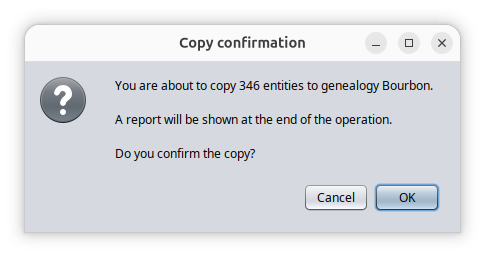
By pressing OK, Ancestris will perform the copy of the entities, of the media files, and update the media links. If you asked for the attachment, Ancestris will do it as well.
The whole process is fast and takes from less than a second to a few seconds.
If you need to undo it, press undo a a few times. Please be aware that the copy of the local media files on your disk storage cannot be undone. You would have to delete the target root directory manually. Hence our recommendation to use a relative temporary root directory.
Report
Upon completion, Ancestris will display a report document with the summary and details of all the work that has been done. It lets you know exactly what was done and you can revisit each entity that was copied and where it was copied to.
This is what the report looks like.
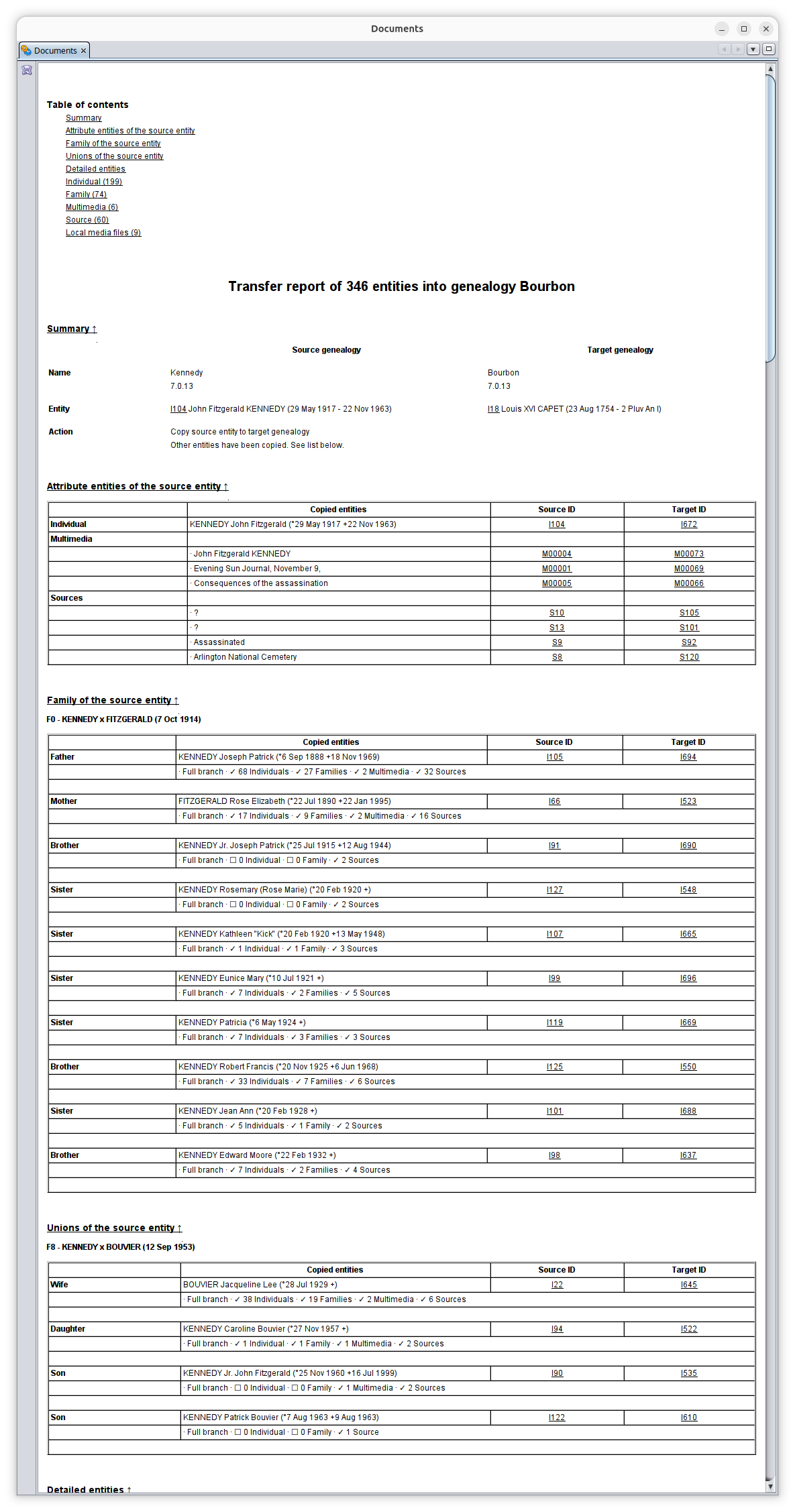
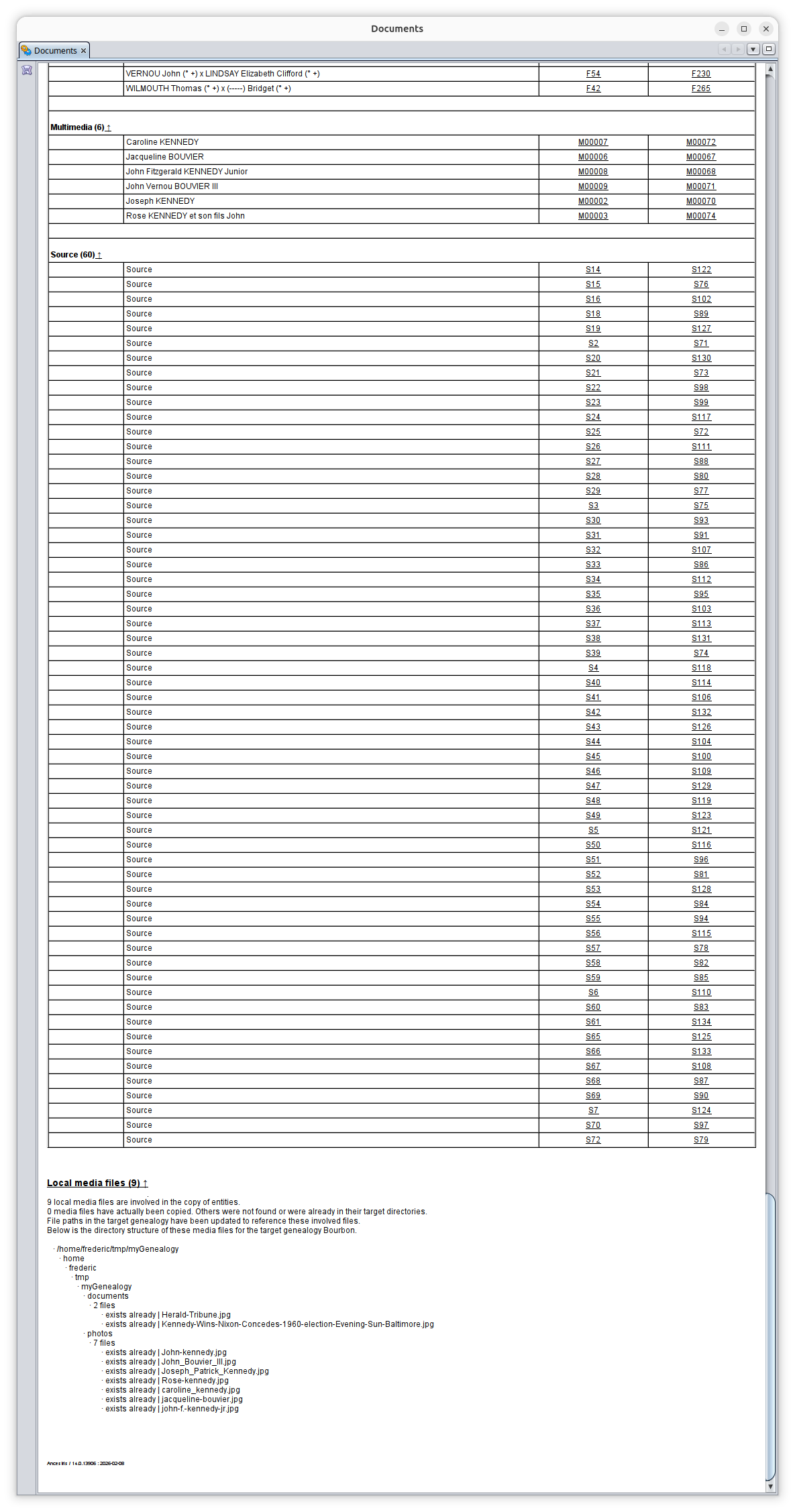
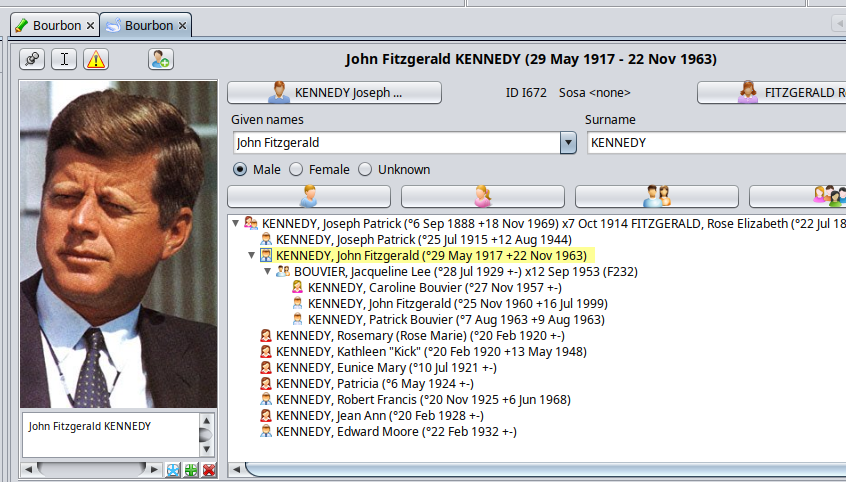
In our example, if you want to check visualy that John Kennedy was copied to the Bouron genealogy, we can click on its target ID in the report and we get this.
As you can see in the image below, we are editing the Bourbon genealogy and we can see John Kennedy with the picture. We also can see that all the family was copied across as well and integrated into the Bourbon genealogy.
Within the same genealogy
Within the same genealogy, the only two actions which are likely to be useful are the attachment of one entiy to another one and the merge of two entities. You are better using the dedicated tools for that.
- Attaching entities within the same genealogy can be done using the Context menu actions and the regular editors possibilities. There is no need to use this tool here to do that.
- Merging two entities of the same genealogy is directly made possible using the Context menu and the "Merge with..." action.
In these situation, the entities of the of the "Copy as well" section are unselected by default. Indeed, copying entities within a given genealogy is likely to generate duplicates, so it is not recommended, unless you have a good reason to do so. If no entities are selected, no copy will be made. In case you really want to do it, the copy action remains possible.
In the specific situation where both the genealogies and the entities are the same, only the copy action is available because you cannot attach an entity to itself and you cannot merge an entity to itself.
Copying media files is not possible either as it would not make sense.
Bottom line is that copying, attaching and merging entities within the same genealogy is not the purpose of this tool, but we leave the possibility open in case you have a really good reason to do so.
Customization
There are no customization settings for this tool.