
Enter specific events
As an Ancestris user, you often give us special cases of events to capture.
One of the questions from a user today was for example:
One person was buried, then exhumed before being buried in another village.
How to deal with this, knowing that one cannot use an EVEN event as it would result in an error of sequence?
The answer to this question was given in the forum.
Other examples are provided below.
Adding foster children (PEDI)
How do I add foster children or stepchildren to a family?
Context
I’ve been using Ancestris for about three years now and am very happy with it. After the rounds of corrections of anomalies in my genealogy file – particularly regarding the addition and removal of birth, marriage and death certificates – I’ve now moved on to the somewhat ‘more complicated’ tasks.
Understanding how some actions affect others can sometimes be a bit tricky. There are fewer and fewer errors being found by the Validation command.
Family ‘clones’ were one such error, and they kept cropping up in the error reports. I had simply linked foster children to two imaginary sets of parents, and these were flagged as ‘clones’.
In other families, I simply omitted them so that the error message ‘disappeared’. Not a very elegant solution, so I have to investigate again.
When it comes to specific operations, such as adding stepchildren or foster children to a family, the user guide refers to “That has to be done with a PEDI attribute”. Nowhere is it explained how to do this. After much experimentation, I think I’ve found a method that works.
My method
I use both the GEDCOM and CYGNUS editors, which I have open in two parallel windows. I’ve found this method works best for me, particularly when removing errors and correcting data. With the first two editors, you can do a lot using “cut and paste”.
As an example of this method, I’m using the Westerhof-Veltman family from Amsterdam, as they had two foster children living with them for several years before the birth of their first child. Below is the final result of the process.
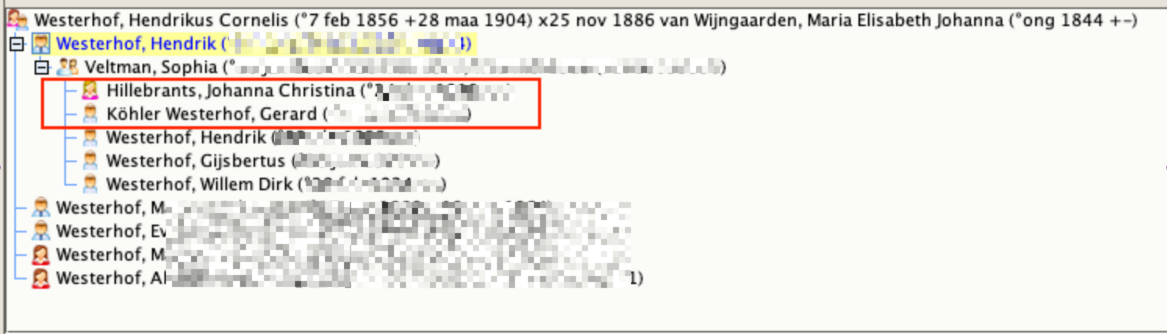
Ensure that all families exist in Ancestris before you start linking them. Do not add any individuals yet; that comes later.
In the case of the second family, there was no legitimate father, but that does not affect the outcome.
2. In the Cygnus editor, go to the foster family, ensure that one of the two heads of household is selected (A) and add a child via (B) (Right-click once on the symbol showing a group of people and click on “Add another child from the family tree”)
3. Enter the surname of the child to be added (A), select the correct person (B) and confirm.
Click on the child you have just added and open the GEDCOM editor. You will now see that the child has become a member of two families. Move the cursor to the correct family and right-click once (A). The “Actions menu for PARENTS” will now open (B). You will now add the correct GEDCOM label using “Add label via the Assistant” (C).
Select ‘Family Tree (PEDI)’ here. This is a rather odd name in itself, but as it is a translation of ‘Pedigree’, which means ‘family tree’, it is understandable. It would be better to name it after the function of the “Relation (PEDI)” label. Double-click on the row and, in the details row, select “Foster parents or Guardians” and confirm with OK.
The child in question should now appear in both families and retain those relationships.
6. It’s not quite perfect yet, because, for example, foster children born within the “minimum timeframe for brothers and sisters” (including one’s own children) do receive an error message stating that they were born too close together. In my case, for example, I have two children who were both born within a three-month period in Sri Lanka in different places to different parents and were subsequently adopted in the Netherlands at the same
time. As soon as they are linked to the foster parents, you get the error message stating that they were born too close together. This “problem” can be circumvented by adding a “_VALID” command under the relevant person and tick the relevant box in the conditions. Essentially, this is a way of telling the system that the information you have entered is indeed correct. You must therefore first check carefully – using official documents, for example – that the dates you are using are correct.
In “Lists and Reports”, under the section “Narrative descent of ancestors or descendants”, there is also no mention of the fact that they are foster or stepchildren. This can only be resolved by adding a note for the child
under the ‘General’ event in the Notes field, including any start and end dates; this will then appear in the report.