When the action has its own description page - it is bold - click on it to get all the details about it.
Certain menu actions only apply to the [selected genealogy](https://docs.ancestris.org/books/user-guide/page/relationships-between-windows#bkmrk-une-s%C3%A9rie-de-fen%C3%AAtre "Current entity, current genealogy") and will therefore only be available if one is open. Otherwise they will be greyed out. To enable them, open a genealogy.
## [Validate Gedcom Compliance and data consistency](https://docs.ancestris.org/books/user-guide/page/validate-gedcom-compliance-and-data-consistency-%28l%29 "Validate Gedcom Compliance and data consistency") Detects non-compliance with the [Gedcom](https://docs.ancestris.org/books/user-guide/page/gedcom "Gedcom") standard and anomalies in the genealogy. ## [Merge duplicates](https://docs.ancestris.org/books/user-guide/page/merge-duplicates-%28l%29 "Merge duplicates") Identifies duplicate [entities](https://docs.ancestris.org/books/user-guide/page/entities "Entities") and merges them. --- ## [Registry Records](https://docs.ancestris.org/books/user-guide/page/registry-records "Registers records") Lets you to enter certificates directly from registry files, or use digitalized registry records, to automatically retrieve records (birth-marriage, death, other) and integrate them into your genealogy. ## [Compare Genealogies](https://docs.ancestris.org/books/user-guide/page/genealogy-compare "Compare Genealogies") Compares genealogies that you have or that are held by other users, to find common geographical areas, with similar cities and lastnames, and similar events. ## [Copy entites across genealogies](https://docs.ancestris.org/books/user-guide/page/copy-entities-across-genealogies "Copy entities across genealogies") This tool helps you copy genealogy individuals and complete family branches from one genealogy to another. --- ## [Datulator](https://docs.ancestris.org/books/user-guide/page/datulator-%28l%29 "Datulator") Helps you calculate dates from date intervals for the same or different calendars. Quite useful when you need to estimate dates to be searched from certificates already found. ## [Calculator](https://docs.ancestris.org/books/user-guide/page/calculator-%28l%29 "Calculator") Displays a simple calculator to avoid having to search for an external one. ## [Research notepad](https://docs.ancestris.org/books/user-guide/page/research-notepad) Create notes independently of a GEDCOM file. --- ## [Common ancestor](https://docs.ancestris.org/books/user-guide/page/common-ancestors-%28l%29 "Common ancestors") Identifies common ancestors between two individuals on your genealogy. ## Quick Reports Runs a reports directly from the menu. [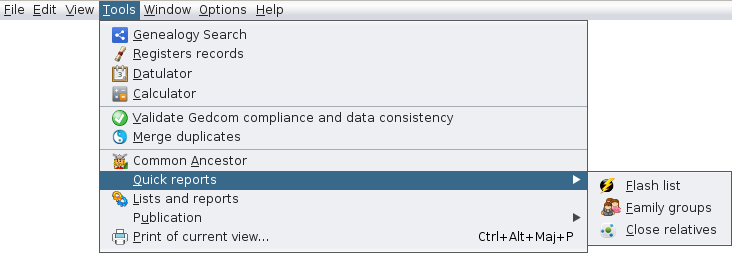](https://docs.ancestris.org/uploads/images/gallery/2020-09/en-Tools-Quick-Reports-menu.png) ### Flash List Runs the **Flash List** report of the selected individual. ### Family Groups Runs the **Family groups** report. This report provides the groups of individuals that are related to one another via family links or association links. A information summary is given for each resulting group. The selection button [](https://docs.ancestris.org/uploads/images/gallery/2022-06/selecticon.png) lets you select groups or subgroups, export them or display them. It is also possible to display generations of groups. The export button [](https://docs.ancestris.org/uploads/images/gallery/2022-01/export.png) lets you export each group individually into a separate Gedcom file. The mark button [](https://docs.ancestris.org/uploads/images/gallery/2022-01/markingicon.png) lets you mark or unmark all groups with the user tag **\_FAMILY\_GROUP** and the name of the group. ### Close Relatives Runs the **Close Relatives** report. ## [Lists and Reports](https://docs.ancestris.org/books/user-guide/page/lists-and-reports-%28l%29 "Lists and Reports") Provides the **Lists and Reports** of Ancestris, a large set of reports you can use on your genealogy, in addition to the ones described above. ## Publication Publishes your genealogy on a file or on the Internet, in a web page format. Ancestris proposes two different possibilities. [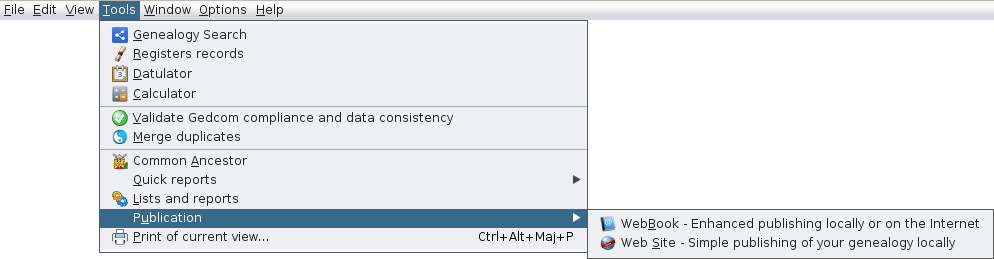](https://docs.ancestris.org/uploads/images/gallery/2020-09/en-Tools-Publications-menu.png) ### [Web Book](https://docs.ancestris.org/books/user-guide/page/web-book-%28l%29 "Web book") Generates a genealogy under the form of multiple web pages, locally or on a remote server. ### [Web Site](https://docs.ancestris.org/books/user-guide/page/web-site-%28l%29 "Web Site") Generates simple web site pages. ## [Print current view](https://docs.ancestris.org/books/user-guide/page/print-of-current-view-%28l%29 "Print of current view") Prints the selected view. A preview window will open. Most views including the [Dynamic Tree view](https://docs.ancestris.org/books/user-guide/page/dynamic-tree-%28l%29 "Dynamic tree"), the Report Output windows and the Editors can be printed.If the content to be printed is wider than a single page, **printing can be done in multi-pages**, that is to say that the image is cut out on several juxtaposable pages. This is very convenient when **printing the Dynamic Tree** or the **Ascendant and Descendant Multi-Generation Tree** in order to post it on a wall.
[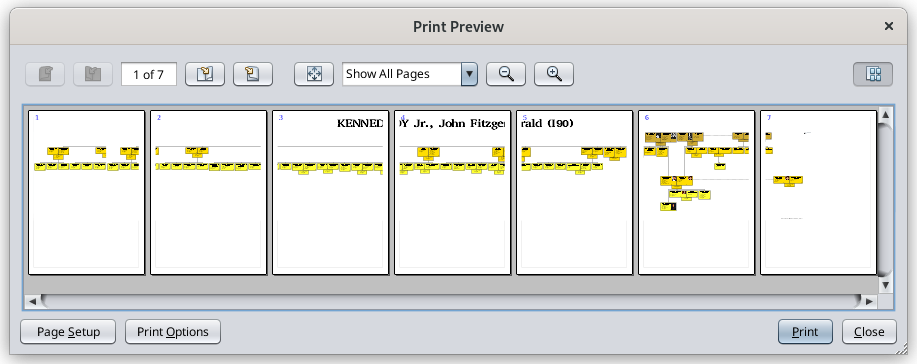](https://docs.ancestris.org/uploads/images/gallery/2022-07/en-multipages-printing.png)