When the action has its own description page - it is bold - click on it to get all the details about it.
[Preferences](https://docs.ancestris.org/books/user-guide/page/preferences "Preferences") Sets the user preferences and customises. ## [Save display settings](https://docs.ancestris.org/books/user-guide/page/windows "Save display settings") Saves or deletes window settings for one or all genealogies. ## Configure Toolbars Customises Ancestris toolbar. Just check or uncheck menu items to display or hide the corresponding tool boxes. Please see [Toolbar](https://docs.ancestris.org/books/user-guide/page/toolbar-%28l%29 "Toolbar") for more information. [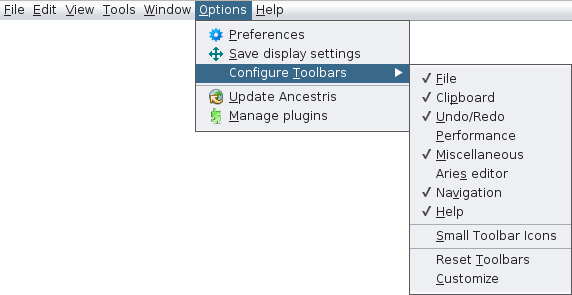](https://docs.ancestris.org/uploads/images/gallery/2020-09/en-Options-Toolbars-menu.png) There are also three other actions: - **Small Toolbar Icons** : reduces the icons size in the Toolbar. - **Reset Toolbars** : resets the default toolbar configuration. - **Customise** : helps you to create your own shortcuts on the toolbar and remove them. ## [Update Ancestris](https://docs.ancestris.org/books/user-guide/page/update-ancestris "Update Ancestris") Checks the latest Ancestris updates and installs them. ## [Manage plugins](https://docs.ancestris.org/books/user-guide/page/extensions "Extensions") Install or uninstall Ancestris modules.