When the action has its own description page - it is bold - click on it to get all the details about it.
## [Create a new genealogy](https://docs.ancestris.org/books/user-guide/page/create-a-genealogy "Create a new genealogy") Starts a wizard to help you create a new genealogy from scratch. ## Open <Default File> (check Preferences) Opens the default genealogy file. This file can be set in the Preferences, [menu Options/Preferences, Files tab](https://docs.ancestris.org/books/mode-demploi/page/pr%C3%A9f%C3%A9rences-ac1#bkmrk-volet-fichiers-0 "Préférences Fichiers"). This option is only available when a default file has been defined in the Preferences. Otherwise, it is greyed out. ## [ Open a genealogy](https://docs.ancestris.org/books/user-guide/page/open-a-genealogy-%28l%29 "Open a genealogy") Opens an existing genealogy, from a [Gedcom](https://docs.ancestris.org/books/user-guide/page/gedcom "Gedcom") file. If the Gedcom file comes from a different software, Ancestris will automatically detect it and start the import process. ## Open recent genealogies Opens a genealogy recently opened. [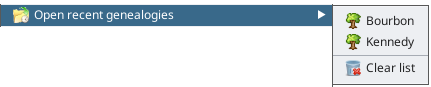](https://docs.ancestris.org/uploads/images/gallery/2024-04/en-file-menu-open-recent-files.png) Just select the corresponding genealogy file or else clear the list. The list is the same as the one displayed in the Welcome panel which only lists the latest 5. ## [Import](https://docs.ancestris.org/books/user-guide/page/migrate-your-genealogy-to-ancestris "Migrate your genealogy to Ancestris") Migrates to Ancestris a genealogy created by a different genealogy software. [](https://docs.ancestris.org/uploads/images/gallery/2020-06/en_Menu_Fichier_Importer.png)Currently we can only import [Gedcom](https://docs.ancestris.org/books/user-guide/page/gedcom "Gedcom") files. This action is available to help you choose the original software, when the automatic detection of the **Open a genealogy** menu action would not detect it correctly. ## [Merge genealogies](https://docs.ancestris.org/books/user-guide/page/merge-genealogies-%28l%29 "Merge genealogies") Merges two genealogies together. This simply adds two different [Gedcom](https://docs.ancestris.org/books/user-guide/page/gedcom "Gedcom") files together without analysing potential duplicates. ## Open repositories references Opens a list of official repositories contact details and internet links. The list is open as part of a Gedcom file. It allows you to quickly visit their respective sites, as well as drag-n-drop the repositories you need to your own genealogy. --- ## [Modify genealogy properties](https://docs.ancestris.org/books/user-guide/page/file-properties "Modify genealogy properties") This opens a window to edit the properties of the [Gedcom](https://docs.ancestris.org/books/user-guide/page/gedcom "Gedcom") file : description, language and author. This action is only available if you have a Gedcom file currently open. ## [Modify place jurisdictions](https://docs.ancestris.org/books/user-guide/page/modify-place-jurisdictions "Modify place jurisdictions") This opens a window to edit the place jurisdictions of the [Gedcom](https://docs.ancestris.org/books/user-guide/page/gedcom "Gedcom") file i.e. the way a place is stored in terms of place structure (e.g. city, zip code, region, country). This action is only available if you have a Gedcom file currently open. ## [Manage medias files](https://docs.ancestris.org/books/user-guide/page/manage-medias-files "Manage medias files") This opens a window to adjust the media file links to the genealogy information they are related to. This action is only available if you have a Gedcom file currently open. ## [Convert Gedcom format](https://docs.ancestris.org/books/user-guide/page/convert-gedcom-format "Convert Gedcom format") This opens a window to modify the [Gedcom](https://docs.ancestris.org/books/user-guide/page/gedcom "Gedcom") norm or its encoding. This action is only available if you have a Gedcom file currently open. --- ## Add to Favorites Adds the selected [Gedcom](https://docs.ancestris.org/books/user-guide/page/gedcom "Gedcom") file to your Favorite links. This window can be accessed from the [Menu / Window / Favourites](https://docs.ancestris.org/books/user-guide/page/window-menu-%28l%29#bkmrk-commande-document "Window Menu"). This action is only available if you have a Gedcom file currently open. --- ## Save Saves the selected [Gedcom](https://docs.ancestris.org/books/user-guide/page/gedcom "Gedcom") file.If other Gedcom files are open, they will not be saved.
For security reasons, Ancestris keeps a number of backup copies : this number can be changed on [Options / Preferences / Files, Number of backup copies](https://docs.ancestris.org/books/user-guide/page/preferences#bkmrk-zone-fichier-log-et- "Preferences, Number of backup copies"). This function is only available if the selected Gedcom file was changed and not yet saved. ## [Save as](https://docs.ancestris.org/books/user-guide/page/save-as-%28l%29 "Save as") Saves all or part of a file under another name. In particular, you can use this action to extract a branch or part of your genealogy and save it in an independent Gedcom file. ## [Export](https://docs.ancestris.org/books/user-guide/page/export-%28l%29 "Export") Exports a genealogy to other genealogy sites, such as Geneanet, Geneweb or CousinsGenWeb. [](https://docs.ancestris.org/uploads/images/gallery/2020-06/en_Menu_Fichier_Exporter.png) It is important to note that since Ancestris saves the content of your genealogy directly in a [Gedcom](https://docs.ancestris.org/books/user-guide/page/gedcom "Gedcom") format, the Ancestris Gedcom file is directly usable by all genealogy software worldwide. Geneanet is a French genealogical data repository. The Geneanet export includes the ability to guide you in the process and opens the Geneanet upload page. The other export actions are French specific and only available as additional plugins to install. ## Close Closes the selected [Gedcom](https://docs.ancestris.org/books/user-guide/page/gedcom "Gedcom") file, **without exiting Ancestris**. ## Exit Exits Ancestris.