You access the context menu when you right-click an object, usually an entity (individual, family, source, etc.) or a property in the entity table or the Gedcom editor (NAME, BIRT, OBJE, FILE, etc.)
[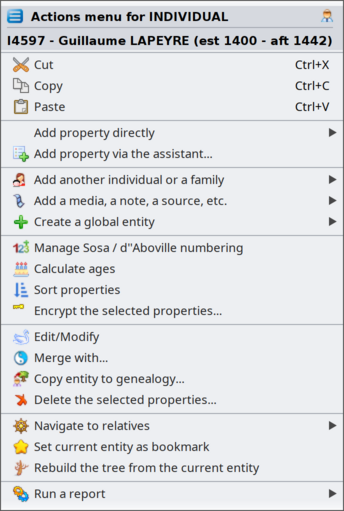](https://docs.ancestris.org/uploads/images/gallery/2026-09/en-menu-context.png) The context menu has a title and a list of action items. The **title** is the name of the 'clicked' entity. The **list of action items** depends on the object you clicked on and the window it is in. That is why it is called a "context" menu. Each proposed action applies to the entity in its specific context.Depending on the object clicked, the context menu includes different actions. Some actions are generic to any object selected. Some actions are specific to the selected object.
The example above is the Context Menu when clicking on an individual Entity in the Dynamic tree view.Only certain views offer a context menu.
They are as follows: - The [Dynamic Tree](https://docs.ancestris.org/books/user-guide/page/dynamic-tree-%28l%29 "Dynamic tree"), for individuals and families. The right click must be made on an individual box or a family box. - The [Entities Table](https://docs.ancestris.org/books/user-guide/page/entities-table-%28l%29 "Entities table"), for all entity categories. The right click must be made on one of the cells, preferably in the column including the identification number. - The [Timeline view](https://docs.ancestris.org/books/user-guide/page/timeline "Timeline"), for individuals. First click on an individual and then right-click anywhere on the view. - The [Cygnus editor](https://docs.ancestris.org/books/user-guide/page/cygnus-editor-%28l%29 "Cygnus editor"), for the individual displayed. The right click must be made on the upper banner giving the full name of the individual. - The [Gedcom editor](https://docs.ancestris.org/books/user-guide/page/gedcom-editor-%28l%29 "Gedcom editor"), for all categories of entities and the information it contains. The right click must be made on any of the lines of the entity or on the lower panel where it displays the entity's description. - The [Entity Card](https://docs.ancestris.org/books/user-guide/page/entity-card-%28l%29 "Entity card"), for all entity categories. The right click must be made on the displayed area. - The [GEDCOM Explorer](https://docs.ancestris.org/books/user-guide/page/gedcom-explorer-%28l%29 "GEDCOM Explorer"), for all entity categories. The right click must be made on an entity. ## Context menu actions Below is a description of all the possible actions when the context menu is called from an entity or a property.**The Context menu can also be called from a Gedcom object**. This is the case with the [GEDCOM explorer](https://docs.ancestris.org/books/user-guide/page/gedcom-explorer-%28l%29 "GEDCOM Explorer"). Please refer to the corresponding page to see what the Context Menu looks like in this case.
#### Change display of Individuals / of Families Configures the layout and the data content of the entity's information to be displayed. This is done by creating or modifying a [blueprint](https://docs.ancestris.org/books/user-guide/page/blueprints "Blueprints"). This action item only appears when you click an entity in its blueprint. #### Cut, Copy, Paste Cuts, copies or pastes the elements clicked. This action item only appears when you click an entity in one of the editors. #### Add property directly Adds a [property](https://docs.ancestris.org/books/user-guide/page/properties "Properties") to the entity. Ancestris will only suggest Gedcom compliant properties to be added at the location clicked. You cannot go wrong there. This action item only appears when you click an entity or a property in the [Gedcom editor](https://docs.ancestris.org/books/user-guide/page/gedcom-editor-%28l%29 "Gedcom editor"). Here is an example of properties than can be added to an individual. [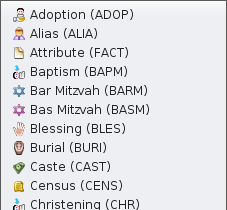](https://docs.ancestris.org/uploads/images/gallery/2020-10/en-add-a-property.png) #### Add property via the assistant... Adds a [property](https://docs.ancestris.org/books/user-guide/page/properties "Properties") to the entity using the following window to guide you: [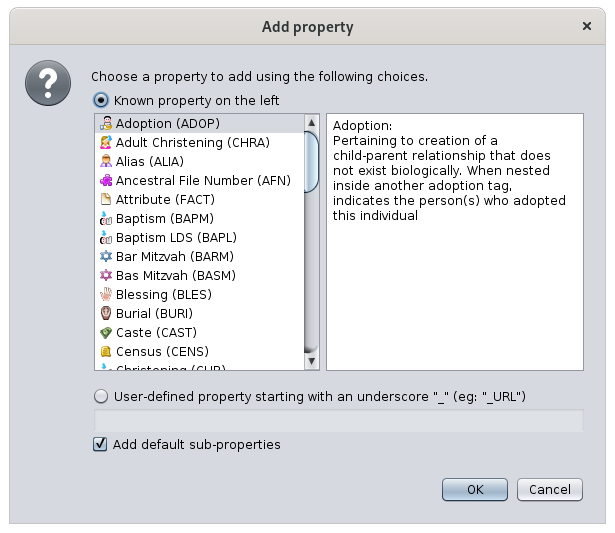](https://docs.ancestris.org/uploads/images/gallery/2020-10/en-add-a-property-assistant.png) A list of possible properties is provided. The selection is made by clicking a property item in the left column. The description of this property appears in the right-hand side column. To create a [user-defined property](https://docs.ancestris.org/books/user-guide/page/tags#bkmrk-symbole "User-defined tags"), click on the corresponding radio-button, and enter its name as shown in the text field. To automatically create sub properties to that property, check the corresponding box. For instance, a MAP property will automatically add the LATI and the LONG properties. This action item only appears when you click an entity or a property in the [Gedcom editor](https://docs.ancestris.org/books/user-guide/page/gedcom-editor-%28l%29 "Gedcom editor"). #### Propagate selected property... Propagates the property on which you have right-clicked: - either, to all entities of the category in the whole genealogy - or, to a particular entity, to be selected from the drop-down menu that will appear. [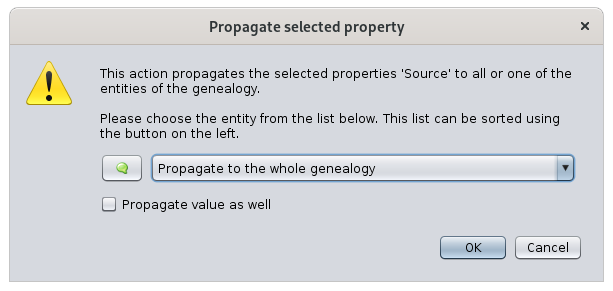](https://docs.ancestris.org/uploads/images/gallery/2020-10/en-propagate.png) The **Propagate also the value of this property,** check the box. It will automatically propagate the property and its value. This action item only appears when you click a property in the [Gedcom editor](https://docs.ancestris.org/books/user-guide/page/gedcom-editor-%28l%29 "Gedcom editor"). #### Add another individual or a family Links an individual or a family to the selected entity. Depending on the entity or on the property clicked, not all sub-actions will be available. Here is the actions items when clicking on an individual: [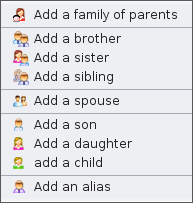](https://docs.ancestris.org/uploads/images/gallery/2020-10/en-add-indivudal-or-family.png) - **Add a family of parents:** adds the two boxes representing the locations of the two parents of the selected individual - **Add a brother/sister/sibling:** adds a brother or a sister to an individual - **Add a spouse:** adds a spouse to an individual. - **Add a son/daughter/child:** adds a child to an individual or to a family. For individuals with multiple families, this should be done from the family. From the individual, the child is added to the first family. - **Add an alias:** adds an alias to the individual. An alias is another individuals who is supposedly distinct originally but who might designate the same person. When the context menu is on a property, the menu shows this: [](https://docs.ancestris.org/uploads/images/gallery/2020-10/en-add-indivudal-or-family-association.png) - **Associate a person:** adds a relationship person to the property, usually an event. #### Add a media, a note, a source, etc. Links an entity, new or existing, to the clicked entity. [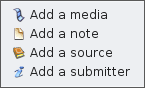](https://docs.ancestris.org/uploads/images/gallery/2020-10/en-add-an-entity.png) These are the possible sub-actions, which depend from the category of the entity clicked: - **Add a media:** adds a new or existing shared [multimedia element](https://docs.ancestris.org/books/user-guide/page/entities#bkmrk-fichier-multim%C3%A9dia "Media"). - **Add a note:** adds a new or existing shared [note](https://docs.ancestris.org/books/user-guide/page/entities#bkmrk-note "Note"). - **Add a source:** adds a new or existing shared [source](https://docs.ancestris.org/books/user-guide/page/entities#bkmrk-source "Source"). - **Add a submitter:** adds a new or existing shared [submitter](https://docs.ancestris.org/books/user-guide/page/entities#bkmrk-fournisseur-d%27inform "Submitter"). #### Create a global entity Creates a global entity that will not be linked to the clicked individual. It will add an entity to your genealogy. [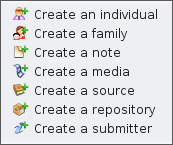](https://docs.ancestris.org/uploads/images/gallery/2020-10/en-create-an-entity.png) These are the possible sub-actions : - **Create an individual:** creates a new entity [individual](https://docs.ancestris.org/books/user-guide/page/entities#bkmrk-individu "Individual") - **Create a family:** creates a new entity [family](https://docs.ancestris.org/books/user-guide/page/entities#bkmrk-famille-0 "Family") - **Create a note:** creates a new entity [note](https://docs.ancestris.org/books/user-guide/page/entities#bkmrk-note "Note") - **Create a media:** creates a new entity [multimedia element](https://docs.ancestris.org/books/user-guide/page/entities#bkmrk-fichier-multim%C3%A9dia "Media") - **Create a source:** creates a new entity [source](https://docs.ancestris.org/books/user-guide/page/entities#bkmrk-source "Source") - **Create a repository:** creates a new entity [repository](https://docs.ancestris.org/books/user-guide/page/entities#bkmrk-lieu-de-stockage "Repository") - **Create a submitter:** creates a new entity [submitter](https://docs.ancestris.org/books/user-guide/page/entities#bkmrk-fournisseur-d%27inform "Fournisseur d'informations") #### [Manage SOSA / d'Aboville numbering](https://docs.ancestris.org/books/user-guide/page/generate-sosa-numbers-%28l%29 "Generate Sosa numbers") Allows you to generate or erase genealogy numberings, starting from the individual on whom you right clicked. The selected individual becomes the Sosa or d'Aboville number 1 of the genealogy and a new numbering of all the ancestors and descendants will be numbered from it. #### [Caculate ages](https://docs.ancestris.org/books/user-guide/page/age-calculation "Age calculation") Calculate ages for the events of the selected individual or family. If an individual is selected, these are the events of his life and related family events. If a family is selected, these are the events of the selected family and related parents. #### Sort properties Sorts the properties of the selected entity according to dates or logical life events. The order appears on the Gedcom editor. #### Resolve anomalies This action only appears if the entity label is invalid. This usually occurs when importing a genealogy from software that creates labels not recognised by the Gedcom standard. In this case, this action is used to rename the label. #### Swivel... Replaces the related entity with another entity to be selected. [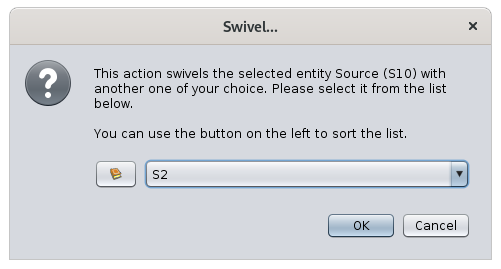](https://docs.ancestris.org/uploads/images/gallery/2020-10/en-swivel.png) This action is only available for properties related to another entity (associated persons, aliases, child in family, spouse in family, linked source, linked note, etc.). #### Set places criteria Opens a window allowing to change the places criteria. [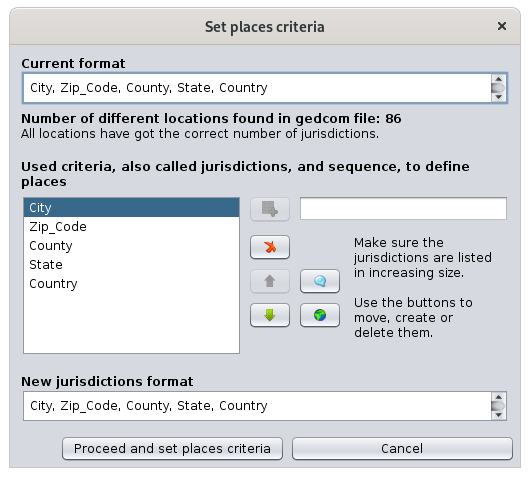](https://docs.ancestris.org/uploads/images/gallery/2020-10/en-set-place-criteria.png) This window is the same as the one used to define the default places format in [File/Properties](https://docs.ancestris.org/books/user-guide/page/file-properties#bkmrk-crit%C3%A8res-de-lieux "File Properties"). This action item only appears when you click a place property in the [Gedcom editor](https://docs.ancestris.org/books/user-guide/page/gedcom-editor-%28l%29 "Gedcom editor"). #### Encrypt the selected properties Allows encryption of all information of the entity. [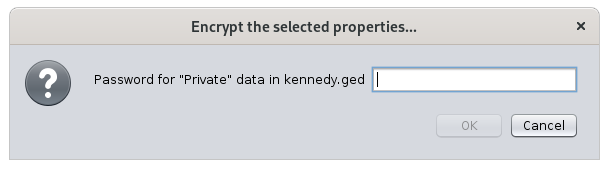](https://docs.ancestris.org/uploads/images/gallery/2020-10/en-encrypt.png)Do not loose the password used for the encryption, it will make it impossible to retrieve the information.
This action item only appears when you click an entity or a property in the [Gedcom editor](https://docs.ancestris.org/books/user-guide/page/gedcom-editor-%28l%29 "Gedcom editor"). #### Edit/Modify Opens the default editor on the selected entity or property. The default editor is defined in the [preferences](https://docs.ancestris.org/books/user-guide/page/preferences#bkmrk-zone-%C3%89diteur "Preferences"). If the Context menu is called from a place property, Ancestris opens the [Places editor](https://docs.ancestris.org/books/user-guide/page/places-editor "Places editor") for all similar places. To only edit one single place, just use one of the editors and directly edit the place fields. #### Merge with... Allows you to merge the selected entity with another one. Please refer to the [Merge duplicate tool](https://docs.ancestris.org/books/user-guide/page/merge-duplicates#bkmrk-manual-action "Merge duplicates") for more explanation. #### Copy entity to genealogy... Allows you copy genealogy individuals and complete family branches from one genealogy to another. #### Delete the selected properties... Deletes the selected properties. [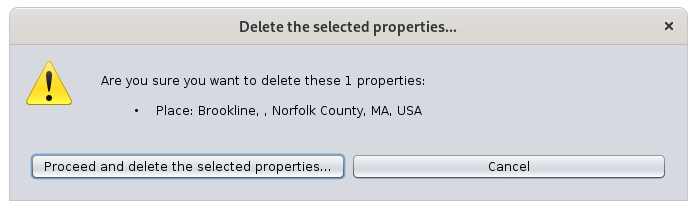](https://docs.ancestris.org/uploads/images/gallery/2020-10/en-delete-property.png)For security reason, Ancestris will ask you to confirm.
This action item only appears when you click an entity or a property in the [Gedcom editor](https://docs.ancestris.org/books/user-guide/page/gedcom-editor-%28l%29 "Gedcom editor"). #### Navigates easily to close relatives of the individual. [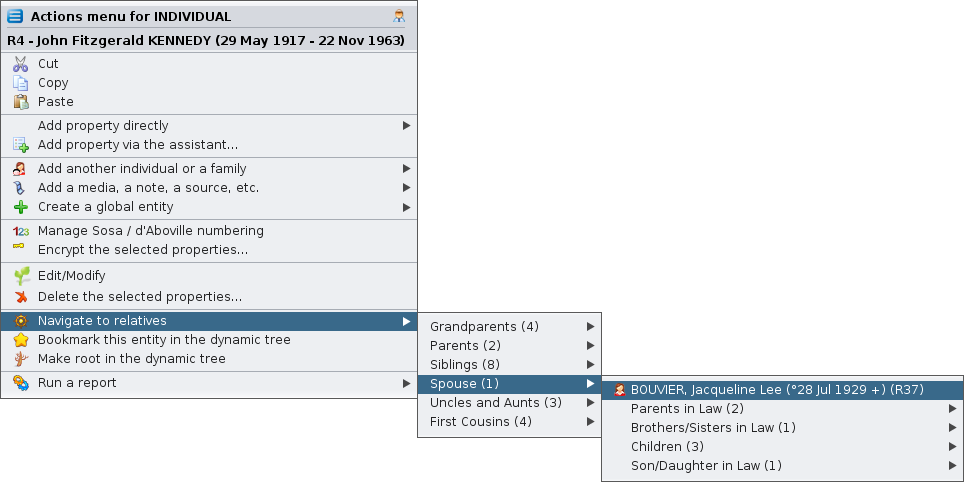](https://docs.ancestris.org/uploads/images/gallery/2020-10/en-navigate-relatives.png) #### Bookmark this entity in the dynamic tree This menu item can be one of two possibilities depending on whether the entity is already bookmarked or not yet. If the entity is not yet bookmarked. [](https://docs.ancestris.org/uploads/images/gallery/2024-04/en-context-menu-add-bookmark.png) In this case, the action creates a bookmark of this entity in the dynamic tree. [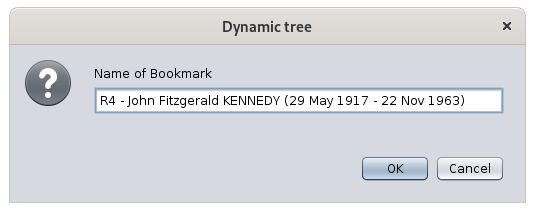](https://docs.ancestris.org/uploads/images/gallery/2020-10/en-bookmark.png) You will then be able to quickly display the dynamic tree of this individual or family using the [bookmark button on the dynamic tree menu bar](https://docs.ancestris.org/books/user-guide/page/dynamic-tree-%28l%29#bkmrk-bouton-signets "Dynamic tree bookmark button"). If the entity is already bookmarked. [](https://docs.ancestris.org/uploads/images/gallery/2024-04/en-context-menu-remove-bookmark.png) In this case, the action removes the bookmark from the list. #### Choose as preferred family for the dynamic tree For family entity only, sets it as the preferred marriage to display in the dynamic tree view. The action looks like this when the family is not chosen yet, and therefore can be set: [](https://docs.ancestris.org/uploads/images/gallery/2020-10/en-preferred-on.png) And it looks like this, with the little star on the icon, when the family has been chosen, and can therefore be unset: [](https://docs.ancestris.org/uploads/images/gallery/2020-10/en-preferred-off.png) #### Make root in the dynamic tree Rebuilds the dynamic tree with the clicked entity as the new root. [](https://docs.ancestris.org/uploads/images/gallery/2026-02/en-context-menu-file.png) #### Open... Opens the corresponding file in the default external viewer depending on the type of file. This action is pecific to a FILE properties. #### Rename file on disk... Renames the file on disk and update the path accordingly. [See the corresponding page for details](https://docs.ancestris.org/books/user-guide/page/media-viewer#bkmrk-%C2%A0-0 "Renaming a file"). This action is pecific to a FILE properties. #### Show the location of this place on the map Opens the geographic view on the selected location. This action is specific to PLAC propoerties. #### Run a report Launches any possible report for the selected entity or for the whole genealogy. A number of sub-menus unfolds as you select this menu item. The structure of these menus follows the structure of the [List and Reports](https://docs.ancestris.org/books/user-guide/page/lists-and-reports-%28l%29 "Lists and reports") window. [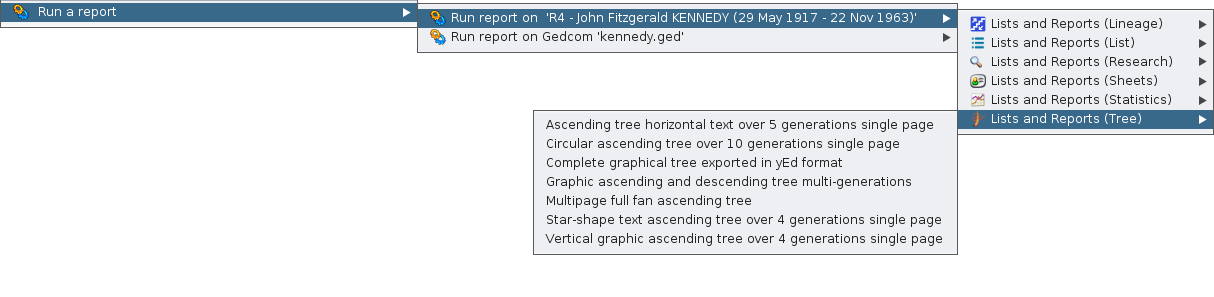](https://docs.ancestris.org/uploads/images/gallery/2020-10/en-run-report.png) #### Swap spouses (for family entities only) Swaps husband and wife in a family. This is much easier to fix a sex error in the individuals than to re-create the whole family. #### Register Photo : birth | marriage | death | misc (if source image attached to an event) In the [act viewer](https://docs.ancestris.org/books/user-guide/page/registers-records#bkmrk-les-fichiers-0 "Registers records - Act viewer"), displays the photo of the certificate corresponding to the event clicked. This menu item is only enabled if the event has a photo coming from an act statement of the Registry records. The [Registry Records](https://docs.ancestris.org/books/user-guide/page/registry-records "Registers records") tool must also is installed, but not necessarily open.