# Modify genealogy properties
This window allows you to modify the description, the main language and the author of any genealogy file in Gedcom format.
The description and the main language properties are saved in the header of the Gedcom file. The author information is stored in a [Submitter](https://docs.ancestris.org/books/user-guide/page/entities#bkmrk-fournisseur-d%27inform "Entities") entity. This information is therefore specific to each genealogy.
Note that other information of the Gedcom file header can be updated using some other menu items of the File menu: [Modify place jurisdictions](https://docs.ancestris.org/books/user-guide/page/modify-place-jurisdictions "Modify place jurisdictions"), [Convert Gedcom format](https://docs.ancestris.org/books/user-guide/page/convert-gedcom-format "Convert Gedcom format").
The header might also include technical information which is not possible to modify via Ancestris, such as the software name and the last modification timestamp.
## Properties than can be edited here
- **Description** of the genealogy
- Main **language** used in the genealogy
- **Author** of the genealogy
What follows is a description of the panels used to modify these properties.
## Description
[](https://docs.ancestris.org/uploads/images/gallery/2022-11/en-file-properties-1.png)
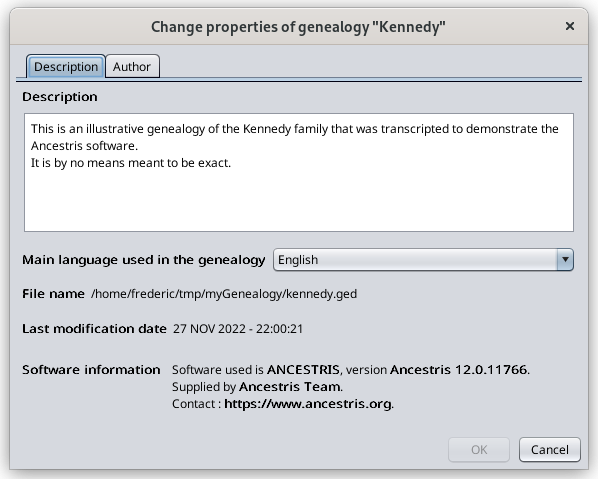
This panel is used to provide and modify the description of the genealogy file. This information is a summary of your genealogy intended to anyone you would share your Gedcom file with.
The drop-down list indicates the language used to write notes, source texts, etc.
- - The language is indicative only.
- It is used by Ancestris to define the default place jurisdictions format (see the [Modify place jurisdictions](https://docs.ancestris.org/books/user-guide/page/modify-place-jurisdictions "Modify place jurisdictions") page).
- There is no further translation in Ancestris related to this parameter.
Also shown in the screen above are the name of the genealogy file, the last modification date and the software that was last used to edit the genealogy file.
## Author
[](https://docs.ancestris.org/uploads/images/gallery/2022-11/en-file-properties-2.png)
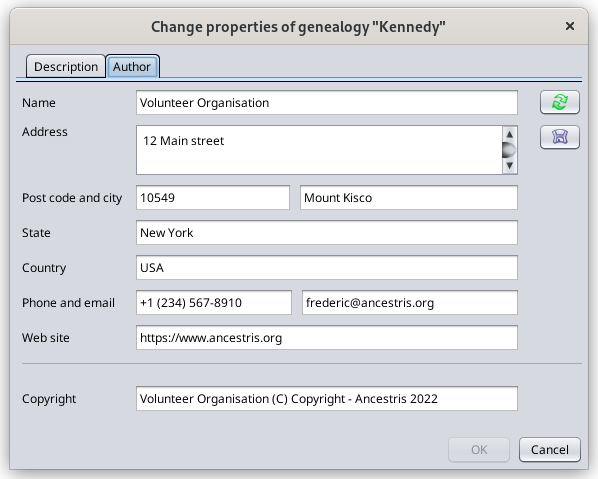
This panel displays the submitter found in the Gedcom file that is referenced in the header section.
You can update these contact details.
Button [](https://docs.ancestris.org/uploads/images/gallery/2020-05/Propri%C3%A9t%C3%A9s_auteur_use.png) copies the author information already memorized before. If such information has not been saved before using the button below, pressing this button will just empty all displayed fields.
Button [](https://docs.ancestris.org/uploads/images/gallery/2020-05/Propri%C3%A9t%C3%A9s_auteur_save.png) stores the displayed author information in case you want to reuse it in other Gedcom files.
## Confirm your changes
The **OK** button becomes enabled as soon as you make some modifications in the information.
Press OK to confirm your changes.
Your Gedcom file will be modified.